Have any questions? Contact us!
Join our team!
Request a free quote or consultation

Picture this: you’re on a construction site, and a pipe clash nobody caught in the plans just halted work. Costs pile up, deadlines slip, and everyone’s frustrated. Now imagine a world where those issues are spotted and fixed before a single brick is laid. That’s the promise of Revit services. As someone who’s spent years navigating the chaos of building projects, I can tell you these services, powered by Autodesk’s Revit software, are a lifeline for architects, engineers, and contractors. They’re not just about drawing pretty buildings; they’re about creating intelligent, data-packed models that make projects smoother, greener, and more cost-effective. In this deep dive, we’ll unpack what Revit services really are, their core features, the latest 2025 updates, and how they streamline every phase of a build. Whether you’re new to Building Information Modeling (BIM) or a seasoned pro, this guide will show you why Revit is a must-have in today’s AEC industry.
Understanding Revit Services: More Than Just Software
Revit services revolve around using Autodesk Revit, a powerhouse BIM tool, to create and manage digital models of buildings. Unlike traditional drafting, where plans are static and disconnected, Revit builds a 3D model that’s a living database. Every wall, window, or duct carries details like materials, dimensions, and costs, all linked so changes update automatically. This is what we call parametric modeling, and it’s a game-changer.
Revit services cover a range of tasks:
- 3D Modeling: Crafting detailed digital representations of entire buildings or specific systems.
- Coordination: Aligning architectural, structural, and MEP (mechanical, electrical, plumbing) designs to avoid conflicts.
- Documentation: Generating plans, schedules, and drawings directly from the model.
- Visualization: Producing renderings or virtual reality experiences to showcase designs.
- Analysis: Running simulations for energy efficiency or structural integrity.
In my experience, what makes these services stand out is their ability to unify teams. Architects sketch creative designs, engineers ensure they’re structurally sound, and contractors pull accurate quantities – all from the same model. It’s like having a single source of truth that everyone trusts, cutting down on miscommunication and costly rework.
Core Features That Drive Revit Services
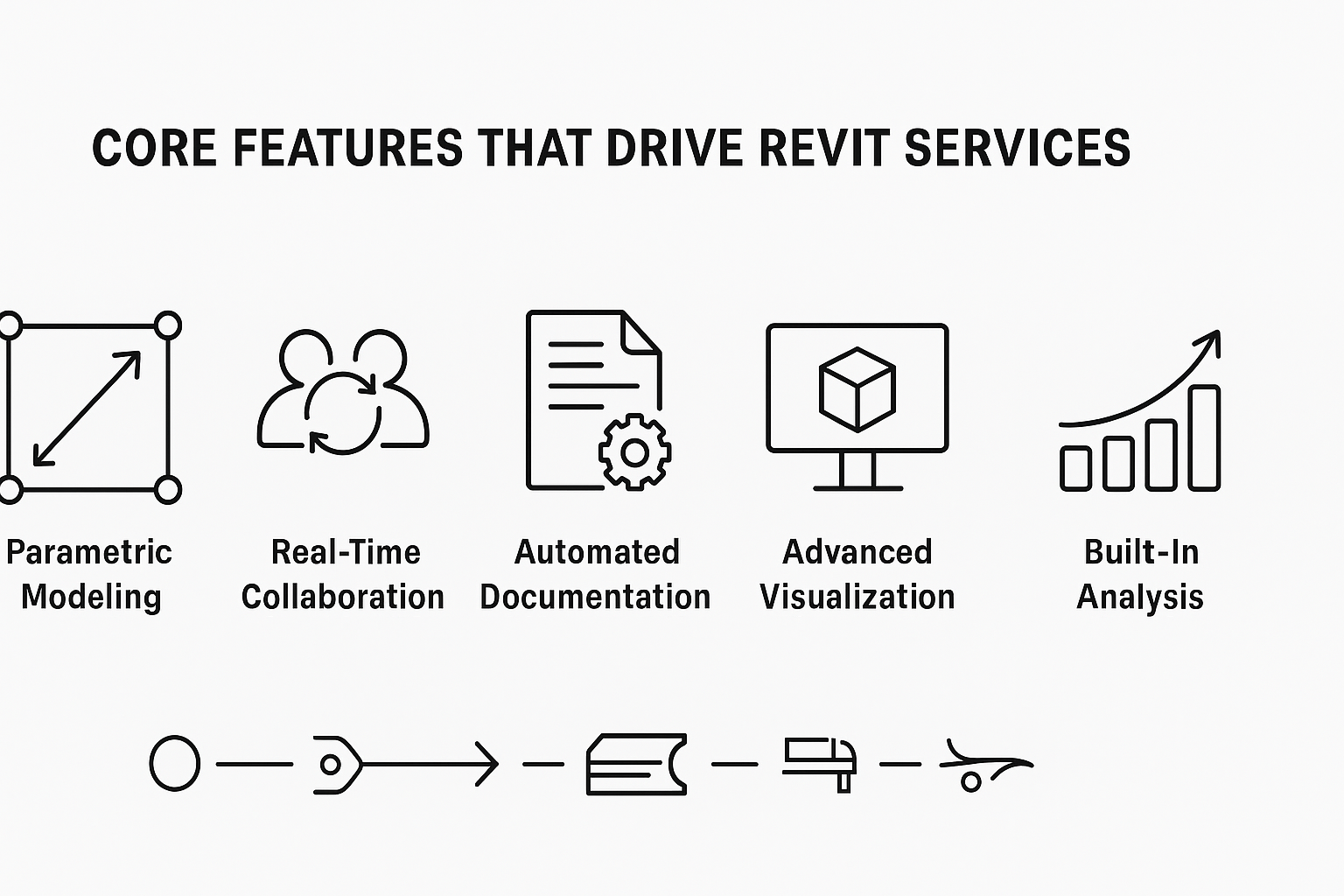
Revit’s strength lies in its robust features, each designed to tackle specific AEC challenges. Let’s break them down to see how they work in practice.
Parametric Modeling for Seamless Updates
At the core of Revit is parametric modeling, where every element is interconnected. If you resize a window, the surrounding walls, schedules, and even cost estimates adjust instantly. This eliminates the tedious manual updates that plague traditional drafting. For example, on a recent project, tweaking a floor plan automatically updated the material takeoffs, saving hours of recalculations.
Real-Time Collaboration
Revit allows multiple team members – architects, engineers, contractors – to work on the same model simultaneously. Changes are visible instantly, reducing version conflicts. Cloud-based collaboration tools make this even smoother, letting global teams sync up without endless email threads. I’ve seen this cut coordination time by half on complex projects.
Automated Documentation
From floor plans to elevations to detailed schedules, Revit generates documents directly from the model. This ensures accuracy, as there’s no disconnect between design and paperwork. Need a bill of materials? It’s ready in a click, and it’s always consistent with the model.
Advanced Visualization
Revit’s visualization tools let you create photorealistic renderings, animations, or even VR walkthroughs. Tools like Twinmotion integrate to produce stunning visuals that help clients see the final product before construction starts. This is a lifesaver for selling designs or catching aesthetic issues early.
Built-In Analysis
Revit supports simulations for energy performance, structural loads, or daylighting. These analyses help optimize designs for sustainability and compliance with building codes. For instance, running an energy simulation can reveal if your HVAC system is oversized, saving costs and emissions down the line.
These features don’t just make work easier; they transform how projects are delivered, making them faster, more accurate, and more collaborative.
Why Revit Services Are Essential in 2025
The AEC industry is evolving fast, with digital twins, AI, and sustainability driving change. Revit services keep you ahead by:
- Embracing Digital Transformation: BIM models are becoming standard, with clients demanding data-rich deliverables.
- Reducing Risk: Early clash detection and accurate docs minimize costly errors.
- Meeting Green Goals: Carbon and energy tools align with global sustainability mandates.
- Enhancing Skills: Learning Revit is a career booster, equipping pros for modern demands.
From my perspective, ignoring Revit is like sticking to a flip phone in a smartphone world. It’s not just about keeping up; it’s about delivering better projects with less stress.
Powerkh’s Innovative Revit Solutions

We are a UK-based company with additional offices in Ukraine and the USA, specializing in Revit-based architectural, engineering, and construction services. Powerkh provides 3D modeling solutions for a variety of industries, supporting clients throughout the design, planning, and construction phases. Using Revit software, we create accurate digital models of buildings and infrastructure, which are used for visualizations and technical documentation.
In addition to Revit modeling, we offer BIM (Building Information Modeling) coordination, clash detection, and design optimization services. These services help improve project efficiency, reduce errors, and enhance collaboration between architects, engineers, and contractors. We ensure that all project details align with client requirements and industry standards.
Our team, experienced in both traditional and digital modeling, focuses on delivering accurate and cost-effective solutions. By leveraging Revit, we provide precise results, ensuring smooth project execution for clients worldwide.
Key Highlights:
- UK-based company with offices in Ukraine and the USA
- Specializes in Revit-based architectural, engineering, and construction services
- Offers 3D modeling, BIM coordination, clash detection, and design optimization
- Focus on delivering accurate, cost-effective, and efficient solutions
- Experienced team skilled in both traditional and digital modeling techniques
- Serves clients across various industries, ensuring alignment with client needs and industry standards
Services:
- Revit Services
- BIM (Building Information Modeling) coordination
- Clash detection and resolution
- Design optimization for improved efficiency
- Technical documentation and visualizations
What’s New in Revit 2025: Elevating the Experience
Revit keeps evolving, and 2025 brings updates that make it even more practical for AEC pros. Here’s a closer look at the latest additions, based on what’s been rolled out this year.
Toposolids for Smarter Site Design
Topography used to be a bit clunky in Revit, but 2025 introduces Toposolids, treating site elements like other system families (walls, floors, etc.). This means you can model landscapes with the same precision as buildings, adjusting slopes or retaining walls with ease. It’s a small tweak but a big win for site planning.
Dark Theme for User Comfort
After years of requests, Revit now offers a Dark Theme. It’s easier on the eyes, especially during late-night crunch sessions. I’ve found it reduces strain and makes long modeling hours more bearable.
Textures Visual Style
A new visual style, Textures, sits between basic colors and full realism. It applies material images for a nuanced look, perfect for client reviews where you want detail without overloading the system. It’s become my go-to for early presentations.
Search in Project Browser
Navigating complex projects just got easier with the Search in Project Browser feature. Type a keyword, and you’ll find that elusive view or schedule in seconds. It’s a simple addition but saves tons of time on big jobs.
MEP Enhancements
For MEP engineers, the Split with Gap tool now supports ducts, pipes, conduits, and more. This aligns Revit with real-world fabrication needs, making it easier to detail systems accurately.
Sustainability and AI Boosts
Revit 2025 adds Total Carbon Analysis to track a project’s carbon footprint, a must for green certifications. Generative design, powered by AI, suggests optimized layouts based on your constraints, speeding up ideation. I’ve seen teams use this to explore dozens of options in hours, not days.
These updates show Revit’s commitment to staying relevant, blending user-friendly tweaks with cutting-edge tech like AI and sustainability tools.
Revit’s Role in the Autodesk Ecosystem

Revit doesn’t work alone; it integrates with other Autodesk tools to create seamless workflows:
- Forma: Automates early-stage design, moving from concepts to schematics.
- Insight: Runs detailed energy and environmental analyses.
- Dynamo: Scripts repetitive tasks, boosting efficiency.
- AutoCAD: Bridges 2D drafting with BIM for hybrid projects.
These integrations create a connected workflow, pulling data from multiple sources into one hub. In 2025, enhanced STEP file support and IFC mappings make it easier to share models across platforms, which is critical for interdisciplinary projects.
How Revit Services Solve Real-World AEC Challenges
Revit services aren’t just theoretical; they address pain points that AEC pros face daily. Here’s how they make a difference:
Catching Errors Before They Hurt
Clash detection is a standout. By integrating architectural, structural, and MEP models, Revit spots conflicts – like a duct running through a beam – before construction. This saves thousands in rework costs. On one project, we caught a plumbing issue early, avoiding a $50,000 fix.
Boosting Sustainability
With energy analysis tools, Revit helps design buildings that meet strict environmental standards. You can simulate energy use, optimize insulation, or test daylighting, all within the platform. This is critical as green codes tighten in 2025.
Streamlining Collaboration
Revit’s cloud-based tools let teams across the globe work together in real time. Annotations, markups, and model updates sync instantly, reducing miscommunication. This is a lifesaver for projects with tight deadlines or dispersed teams.
Saving Time and Money
By automating documentation and quantity takeoffs, Revit cuts manual work. Fewer errors mean less rework, and accurate schedules keep projects on track. I’ve seen firms shave weeks off timelines by leveraging these efficiencies.
Customizing for Flexibility
Revit’s family modeling lets you create custom components tailored to project needs or local regulations. This is huge for global teams dealing with varied standards, ensuring models fit specific requirements without starting from scratch.
How Revit Services Support Every Project Stage
Revit services are a game-changer for architecture, engineering, and construction projects, guiding them from initial ideas to long-term maintenance. They’re like a trusted partner that adapts to each phase, making sure everything runs smoothly and accurately. As someone who’s seen Revit in action on bustling job sites and in quiet design studios, I can tell you it’s all about keeping things connected and efficient. Below, I’ve outlined how Revit services apply across the project lifecycle, plus a real-world example to show their value.
- Quickly build 3D models during conceptual design to test ideas and visualize possibilities, often using generative design to explore layouts based on space or budget goals.
- Develop detailed models in the design phase, ranging from LOD 100 to 500, capturing structural elements, MEP systems, and more, while coordinating disciplines to prevent conflicts.
- Automatically generate precise floor plans, sections, schedules, and shop drawings during documentation, ensuring all outputs align perfectly with the model for fabrication.
- Provide contractors with accurate quantity takeoffs and 4D scheduling during construction, alongside design-to-fabrication workflows that streamline prefabrication processes.
- Deliver data-rich models for facility management to support maintenance and operations, with as-built models ready for renovations or retrofits.
One powerful example is Scan to BIM, where laser scans of existing structures become editable Revit models. On a recent project, a team tackled a century-old building with no original plans. By turning point cloud data into a detailed model, they simplified the renovation, dodging costly errors and keeping the project on track.
Who Benefits from Revit Services?
Revit services are a fit for a wide range of AEC professionals. Here’s a quick rundown:
- Architects: Design complex forms, visualize ideas, and generate accurate plans.
- Engineers: Run structural or MEP analyses, ensuring designs are feasible.
- Contractors: Extract quantities and drawings for bidding and construction.
- Interior Designers: Model spaces with custom fixtures and finishes.
- Surveyors: Convert point clouds into BIM models for as-builts.
- Facility Managers: Use models for maintenance and future upgrades.
Whether you’re at a small firm or a global giant, Revit scales to your needs. Smaller teams might use Revit LT for core tasks, while larger ones tap specialized versions for MEP or structural work.
Final Thoughts: Revit Services as Your Project Partner
Revit services are more than a toolset; they’re a smarter way to build. By combining 3D modeling, collaboration, and analysis, they tackle the chaos of construction head-on. The 2025 updates make them even more intuitive, with features like Dark Theme and AI-driven design pushing the envelope. Whether you’re sketching a boutique hotel or coordinating a massive factory, Revit services streamline the process, save money, and boost quality. If you’re not already on board, now’s the time to explore how they can elevate your work. Trust me, once you see the difference, there’s no going back to old-school drafting.
Frequently Asked Questions
What makes Revit different from traditional CAD software?
Revit is a BIM tool focused on 3D modeling with integrated data, unlike traditional CAD, which primarily handles 2D drafting. Its parametric system links all elements, so changes update automatically, and it supports collaboration and analysis, making it ideal for complex AEC projects.
Can Revit services be used for small projects?
Yes, Revit scales to any project size. Revit LT offers core features for smaller jobs, while the full version handles everything from homes to skyscrapers, providing flexibility for budgets and complexity.
How do Revit services support sustainable design?
Revit includes energy analysis tools and Total Carbon Analysis to evaluate a building’s environmental impact. These help optimize designs for efficiency, reduce emissions, and meet green building standards.
Who should learn Revit in the AEC industry?
Architects, engineers, contractors, designers, surveyors, and facility managers benefit from Revit skills. It enhances collaboration, reduces errors, and positions professionals as leaders in a BIM-driven industry.
Have a BIM Project? Talk To Us.
Contact UsOur Case Studies
We have handled 200+ BIM & VDC projects for commercial, industrial, and residential sectors.
Our work includes:
Formwork design automation
Our client from
California, USA
Suspended ceiling design automation
Our client from
New York, USA
Wall framing design automation
Our client from
California, USA