¿Tiene alguna pregunta? Póngase en contacto con nosotros
¡Únete a nuestro equipo!
Solicitar presupuesto o consulta gratuita

By Stage 3 of a construction project, most of the big-picture ideas are already on the table. What comes next is getting all those ideas to work together without clashing – literally. That’s where BIM support steps in.
RIBA Stage 3, also known as spatial coordination, is all about making sure architectural layouts, structure, and building systems line up properly before planning approval and technical development. But coordinating all that across teams, disciplines, and evolving drawings? It’s not as simple as sharing a few PDFs. BIM support helps catch problems before they get poured into concrete.
Whether you’re an architect trying to keep your design intact or a consultant looking to avoid headaches later, getting the right kind of BIM help at this stage can save a lot of time and money down the line. Let’s break down what it actually involves and why it matters.
The Goal of Stage 3: Coordinated, Buildable Design
Before we even talk about modeling, it’s worth zooming in on the point of Stage 3. This phase is about making sure that all parts of the design talk to each other. That means the architecture, structure, and MEP systems are not just developed in parallel but actually coordinated.
You’re not just fine-tuning floor plans at this point. You’re resolving how a ventilation duct passes over a beam, or how the lift core sits within the column grid, or how fire escape routes align with stairwells and wall types.
It’s not always glamorous work, but it’s essential.
What Is BIM Support in This Context?
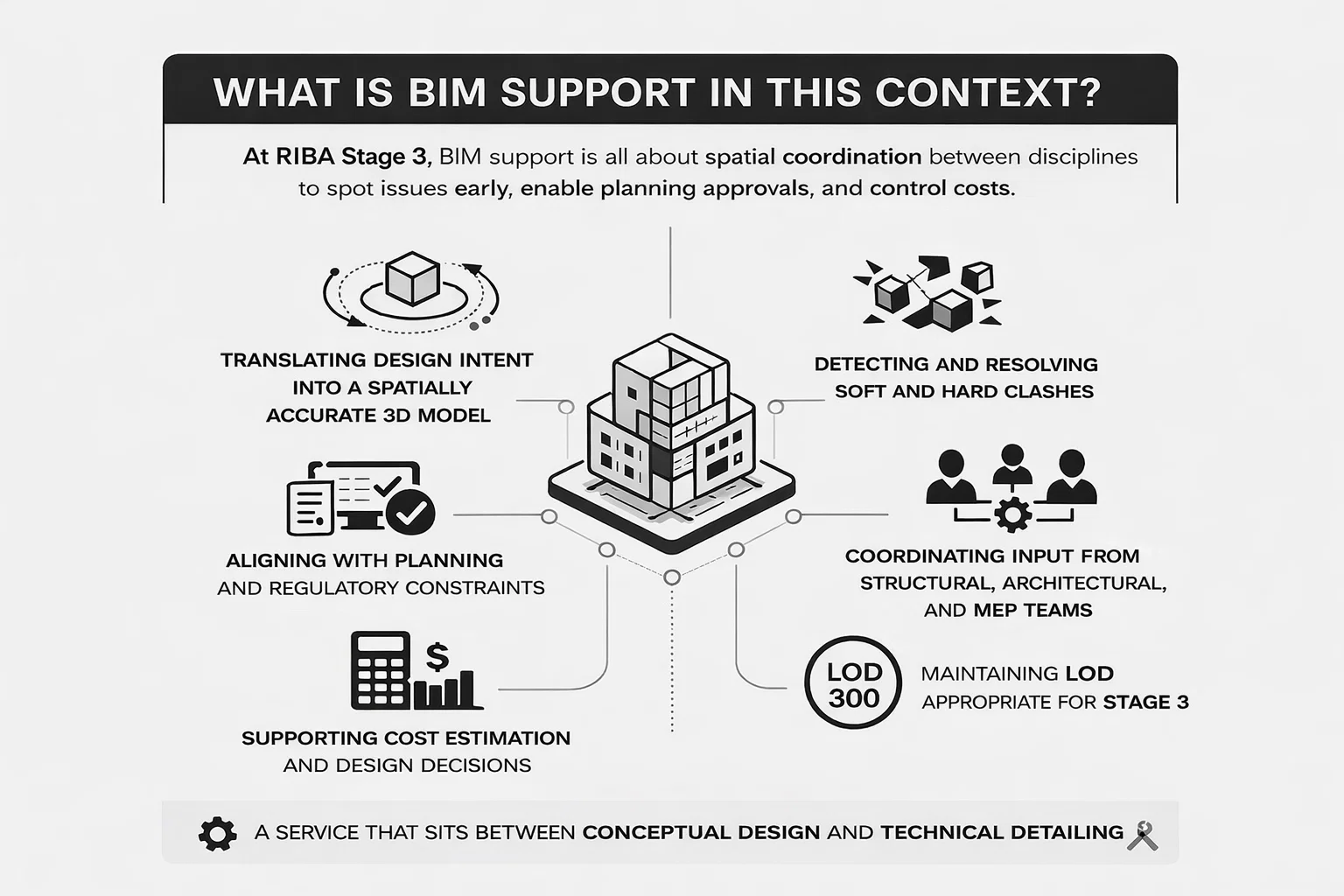
BIM (Building Information Modeling) is often associated with detailed models, clash detection, and 3D walkthroughs. But during RIBA Stage 3, BIM support has a very specific focus: enabling spatial coordination between disciplines, while supporting planning applications and cost control.
It’s not about producing final fabrication drawings just yet. It’s about creating a shared, functional model that all parties can work with to spot issues early.
Good BIM support at this stage includes:
- Translating design intent into a spatially accurate 3D model.
- Detecting and resolving soft and hard clashes.
- Aligning with planning and regulatory constraints.
- Coordinating input from structural, architectural, and MEP teams.
- Supporting cost estimation and design decisions.
- Maintaining LOD (Level of Detail) appropriate for Stage 3.
It’s a service that sits between conceptual design and technical detailing. Think of it as the engine room of coordination.
Why This Stage Often Goes Wrong Without BIM
At Stage 3, there’s a dangerous temptation to assume everything is fine as long as the 2D drawings line up and the planning team is happy. But the reality is, even small design oversights can snowball later in the project.
Here are a few common issues that pop up when BIM support is missing or underused:
- Ceiling voids are too shallow for both ducts and lighting.
- Structural walls conflict with riser shafts.
- Equipment doesn’t fit in the plant room.
- The architect’s layout looks great, but services have nowhere to go.
Most of these problems stem from one thing: isolated design thinking. Each team works in its own software, on its own schedule, assuming everything will just come together later. It rarely does.
BIM support during Stage 3 helps surface these issues early, while there’s still room (and budget) to adjust.
Our Broader Role in RIBA Stage 3 Support

En Powerkh, we focus on design continuity. That means we don’t just help teams model a space – we help make sure what gets designed can actually be built, without losing intent along the way. During RIBA Stage 3, that starts with structural and MEP Revit modeling. We support design teams as they develop and refine layouts, test spatial relationships, and prepare for planning or internal approvals. Our aim is to help you move from idea to coordination-ready models with clarity and minimal friction.
What makes our Stage 3 support different is the focus on critical zones and real risk. We zero in on plant rooms, risers, ceiling voids, and any space where systems converge or tolerance is tight. Our clash detection isn’t just a list of hits – it’s backed by engineering review and model health checks to highlight what actually matters before design gets fixed. Whether we’re supporting a single building or a complex mixed-use site, we stay close to the coordination process to protect the design and keep teams aligned as the project moves forward.
If your project needs BIM modeling, coordination, or support navigating spatial challenges during RIBA Stage 3, we’d be happy to talk through the scope. Our role is to help teams move faster, avoid surprises, and maintain control as designs evolve.
What Happens During Stage 3 BIM Modeling?
If you’re working with a BIM support team during RIBA Stage 3, the process typically includes several steps, often in parallel with design development:
1. Input Analysis
The BIM team starts by reviewing the design team’s inputs: 2D drawings, PDFs, early Revit models, and sometimes even scanned sketches. The goal is to understand what’s fixed and what’s still in flux.
2. 3D Model Setup
Using tools, the team begins to build a base model or upgrade an existing one. This includes walls, floors, structural grids, and basic service zones. Elements are tagged with data that matches the design intent.
3. Spatial Coordination
This is where the work gets serious. MEP, structure, and architecture are layered together in the model. Clashes are flagged. Layout conflicts are visualized. It’s a bit like puzzle-solving, but in 3D.
4. Clash Detection and Resolution
Software tools are used to identify both hard clashes (physical overlaps) and soft clashes (tolerance issues or code violations). Reports are shared, discussed, and resolved collaboratively.
5. Planning Support
Once coordination is far enough along, the model can be used to support planning submissions, especially if 3D visuals or shadow studies are needed. BIM also helps demonstrate compliance with height, massing, and access standards.
6. Ongoing Updates and Feedback Loops
As changes come in from the client, consultants, or planners, the model is updated to reflect the latest design decisions. This keeps everyone aligned and reduces the risk of working off outdated drawings.
What’s Included in a Stage 3 BIM Support Package?
Every provider offers something slightly different, but a good Stage 3 BIM package will typically include:
- A coordinated 3D model developed to a level suitable for spatial coordination and planning, as defined by project-specific requirements..
- Clash detection reports with prioritization.
- Design change tracking.
- Room data sheets or schedules.
- Support for Design and Access Statements.
- Exported drawings (plans, sections, elevations) aligned with the model.
- Planning-ready visuals if needed.
Some teams also offer live collaboration via cloud platforms, which helps the architect and consultants work directly inside the coordinated environment.
How This Differs from Later Stages
It’s easy to confuse BIM support at Stage 3 with what happens in Stage 4 and beyond. But there’s a clear difference.
At Stage 3, the emphasis is on coordination and design viability. You’re still refining the layout, adjusting strategies, and testing options. Details like bolt sizes or HVAC pressure ratings usually come later.
In Stage 4, the focus shifts to technical documentation and buildability. That’s when the model gets loaded with specs, tolerances, construction sequences, and fabrication details.
In short:
- Stage 3: Is everything spatially coordinated and workable?
- Stage 4: Can this be built, priced, and approved for construction?
Where BIM Support Adds the Most Value at Stage 3
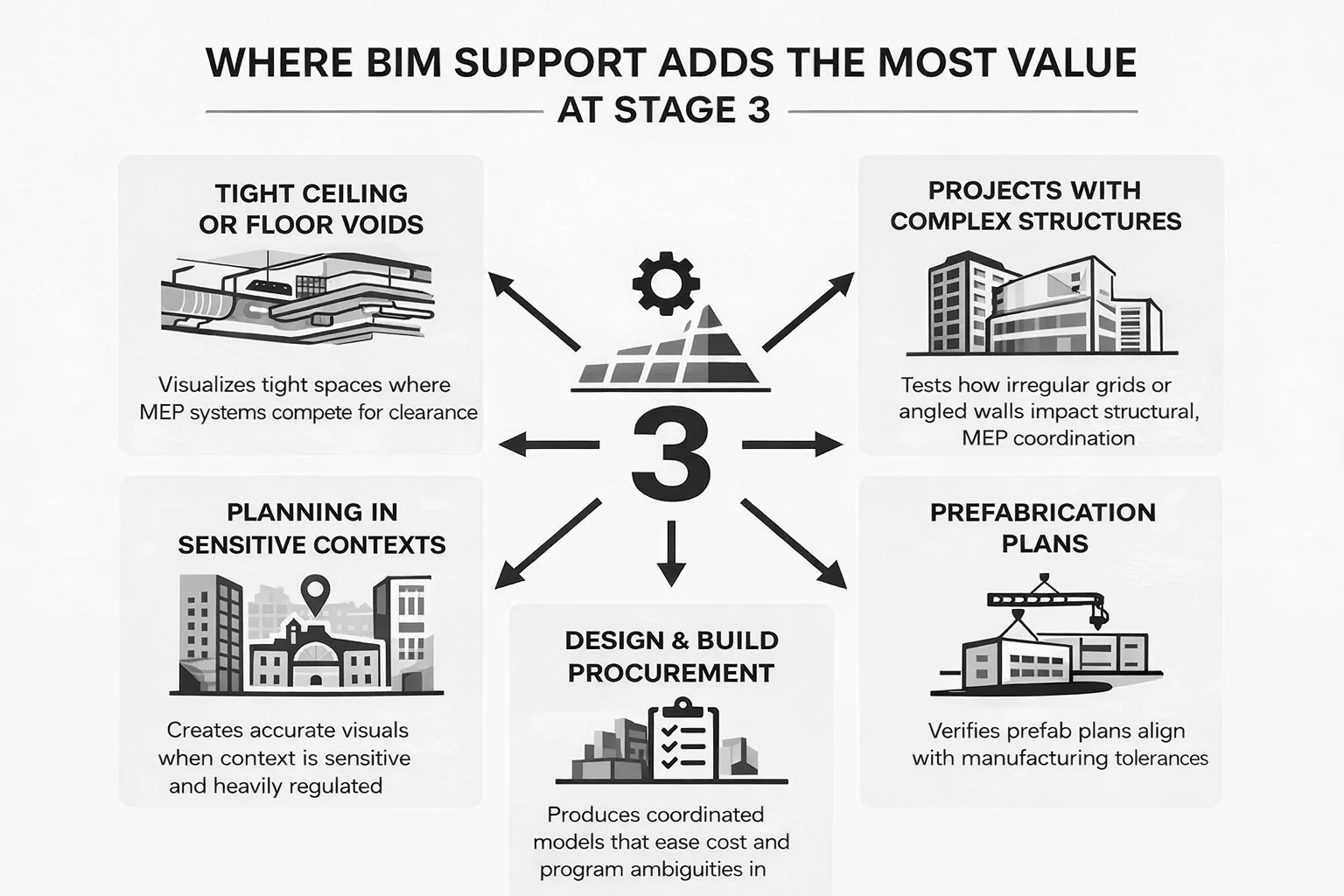
Not every project needs deep BIM input at every stage. But for most mid-to-large builds, here’s where Stage 3 BIM support really pays off:
Tight Ceiling or Floor Voids
When mechanical and electrical systems compete for limited space above ceilings or below floors, things get complicated fast. Even small conflicts between ducts, beams, lighting trays, and sprinkler lines can derail coordination. A Stage 3 model helps visualize these overlaps early, so you’re not reworking layouts or scrambling for extra clearance later in Stage 4 or on site.
Projects with Complex Structures
Irregular grids, angled walls, split-level transitions, or curved façades are almost guaranteed to generate conflicts that won’t show up clearly in 2D. BIM support allows teams to test how structural geometry interacts with MEP routes, wall build-ups, and floor heights before any drawings are signed off. It’s a safeguard against surprises that usually show up too late.
Planning in Sensitive Contexts
If the project is in a conservation area, next to heritage buildings, or in a dense urban setting, planners often ask for more than basic drawings. A coordinated BIM model can produce accurate visuals that show how the design respects context – massing, height, views, and access points. These assets often help reduce objections and speed up approvals.
Prefabrication Plans
For any scheme moving toward off-site manufacture, whether it’s bathroom pods, structural frames, or full modular construction, coordination needs to happen early. BIM support at Stage 3 ensures that layouts and interfaces are accurate and aligned with manufacturing tolerances. That prevents costly changes downstream and keeps prefab delivery on schedule.
Design & Build Procurement
When a project is heading for Design & Build, contractors expect to review a coordinated model as part of the tender. Without it, they often assume more risk than necessary and reflect that in their pricing. BIM support helps produce a model that gives bidders confidence, reduces guesswork, and encourages sharper pricing. It also makes handover from design to delivery smoother.
Common Misunderstandings About Stage 3 BIM Support
Let’s clear up a few misconceptions:
- “Stage 3 is too early for modeling”: Not true. The purpose at this stage is coordination, not detailing. You’re modeling relationships, not nuts and bolts.
- “We’ll sort clashes later”: Sure, but it’ll be more expensive. Fixing a clash in Stage 4 can mean reworking dozens of drawings. Fixing it in Stage 3? A model update and a quick call.
- “BIM is just a software thing”: Nope. BIM support is about process, communication, and strategy. The software is just the toolbox.
- “Stage 3 models don’t need to be accurate”: They do. Accuracy in spatial coordination prevents issues from cascading down the pipeline.
Reflexiones finales
RIBA Stage 3 isn’t just another design phase to tick off. It’s a make-or-break moment for coordination, and how you approach it sets the tone for the rest of the project.
BIM support during this stage gives teams the visibility, alignment, and clarity needed to deliver designs that work, not just on screen, but on site.
The drawings might still be evolving, but the relationships between components, systems, and disciplines need to be rock solid by the end of Stage 3. Otherwise, you’re not heading into Stage 4 – you’re heading into damage control.
If you’re thinking about BIM support at this stage, the best time to bring it in is early. The second-best time? Right now.
PREGUNTAS FRECUENTES
1. Do I really need BIM support at RIBA Stage 3, or can it wait until later?
You can wait, but you’ll probably regret it. Stage 3 is when spatial coordination happens, and that’s exactly where BIM support shines. Without it, small clashes or layout issues often slip through and become much more expensive problems in Stage 4 or even on site. Early support keeps the design clean and saves you from backtracking.
2. What does a “coordinated model” actually mean at this stage?
At Stage 3, a coordinated model isn’t about detailing every bolt or bracket. It means that architectural, structural, and MEP elements are aligned in 3D space. Things fit where they should. Ducts don’t hit beams. Plant rooms have enough space. It’s about making sure the big pieces play nicely before the real technical grind begins.
3. How is Stage 3 BIM different from what happens later in Stage 4?
Think of Stage 3 BIM as setting the stage: you’re resolving the major spatial conflicts and confirming the design makes sense across disciplines. Stage 4 then takes that coordinated base and adds technical depth – detailed specs, buildability checks, tolerances, and construction sequencing. Both are important, but they serve very different purposes.
4. How detailed should the model be at RIBA Stage 3?
It depends on the project, but generally you’re aiming for LOD 200 or early LOD 300. That’s enough detail to support spatial coordination and planning approvals, but not so much that you’re modeling parts that might still change. You want clarity without locking in decisions too early.
5. Is clash detection the only thing BIM support helps with at this stage?
Not at all. Clash detection is just one piece. A good BIM team also supports planning visuals, helps define service zones, tracks design updates, and ensures the model reflects what’s actually being agreed. It’s coordination, communication, and risk reduction all wrapped into one process.
6. Can BIM support help with planning applications?
Yes, and more than people often realize. A well-developed Stage 3 model can generate accurate visuals, sun studies, massing diagrams, and access plans that support planning submissions. It can also help justify design decisions or show how the proposal fits within constraints.

¿Tiene un proyecto BIM? Hable con nosotros.
Contacte con nosotrosNuestros casos prácticos
Hemos gestionado más de 200 proyectos BIM y VDC para los sectores comercial, industrial y residencial.
Nuestro trabajo incluye:
Automatización del diseño de encofrados
Our client from
California, USA
Automatización del diseño de falsos techos
Our client from
New York, USA
Automatización del diseño del entramado de muros
Our client from
California, USA