¿Tiene alguna pregunta? Póngase en contacto con nosotros
¡Únete a nuestro equipo!
Solicitar presupuesto o consulta gratuita

Point Cloud to Revit sounds straightforward until you receive a model that technically meets the brief but doesn’t work for design, coordination, or decision-making. That gap usually comes down to assumptions. About level of detail, level of information, tolerances, and what the model is actually meant to be used for.
In the UK, scan-derived Revit models are used for very different purposes. Some are clean record models for design teams to reference. Others are coordination-ready models meant to be pushed through clash detection and construction workflows. The difference matters, and it should be defined before a scanner ever sets foot on site.
This article breaks down what you’ll typically receive from a Point Cloud to Revit service in the UK, how LOD and LOI are commonly interpreted in practice, the distinction between coordination models and record models, and what to specify in your brief to avoid rework, delays, or mismatched expectations. We’ll also touch on realistic turnaround times, because speed on paper and speed on a live project are rarely the same thing.
If you’ve ever opened a Revit file and thought, “This isn’t wrong, but it’s not usable,” this is for you.
What “Point Cloud to Revit” Really Means
At its core, point cloud to Revit is the process of converting laser scan or photogrammetry data into a structured Revit model. In the UK, this usually starts with terrestrial laser scanning, sometimes supported by drone capture for roofs, facades, or larger sites.
The output is a Revit model that represents existing conditions. That sounds simple, but the intent behind that model can vary widely.
Some models are created purely for reference. They exist so designers can trace over them, measure from them, or understand spatial constraints. Others are expected to function as active BIM models, capable of coordination, clash detection, or downstream detailing.
Both are valid. The mistake is treating them as the same thing.
How We Approach Point Cloud to Revit at Powerkh

En Powerkh, we treat point cloud to Revit as part of a wider continuity-led workflow, not a standalone modelling exercise. Our role is to make sure verified existing conditions support real design decisions early, survive coordination pressure, and still hold up once construction starts. The goal is simple: reduce guesswork and protect design intent from day one.
We are a UK-based, engineering-led digital construction consultancy, but our work is not limited to the UK. Powerkh operates across 11 countries, including the United States and multiple European markets, supporting project teams working under different standards, delivery models, and regulatory environments. That engineering focus shapes how we work. We do not model for appearance or headline LOD alone. We apply engineering judgement to what should be modelled, how precise it needs to be, and how the information will be used across design, coordination, and site activity. This approach helps teams avoid unnecessary detail while still working with data they can trust.
Design continuity is the thread that connects everything we do. We stay close to the original intent and follow it through coordination and construction, flagging where it is compromised, misinterpreted, or drifting on site. Point cloud data gives us a reliable reference, but it is the way that data is interpreted, aligned, and carried forward that makes it valuable.
In practice, this means scan-based existing conditions models that are aligned to project coordinates, built with clear intent, and ready for the next stage of work. By combining BIM, engineering judgement, and reality-based verification, we help ensure that what gets designed is what actually gets built.
What You Will Receive: Typical Deliverables Explained
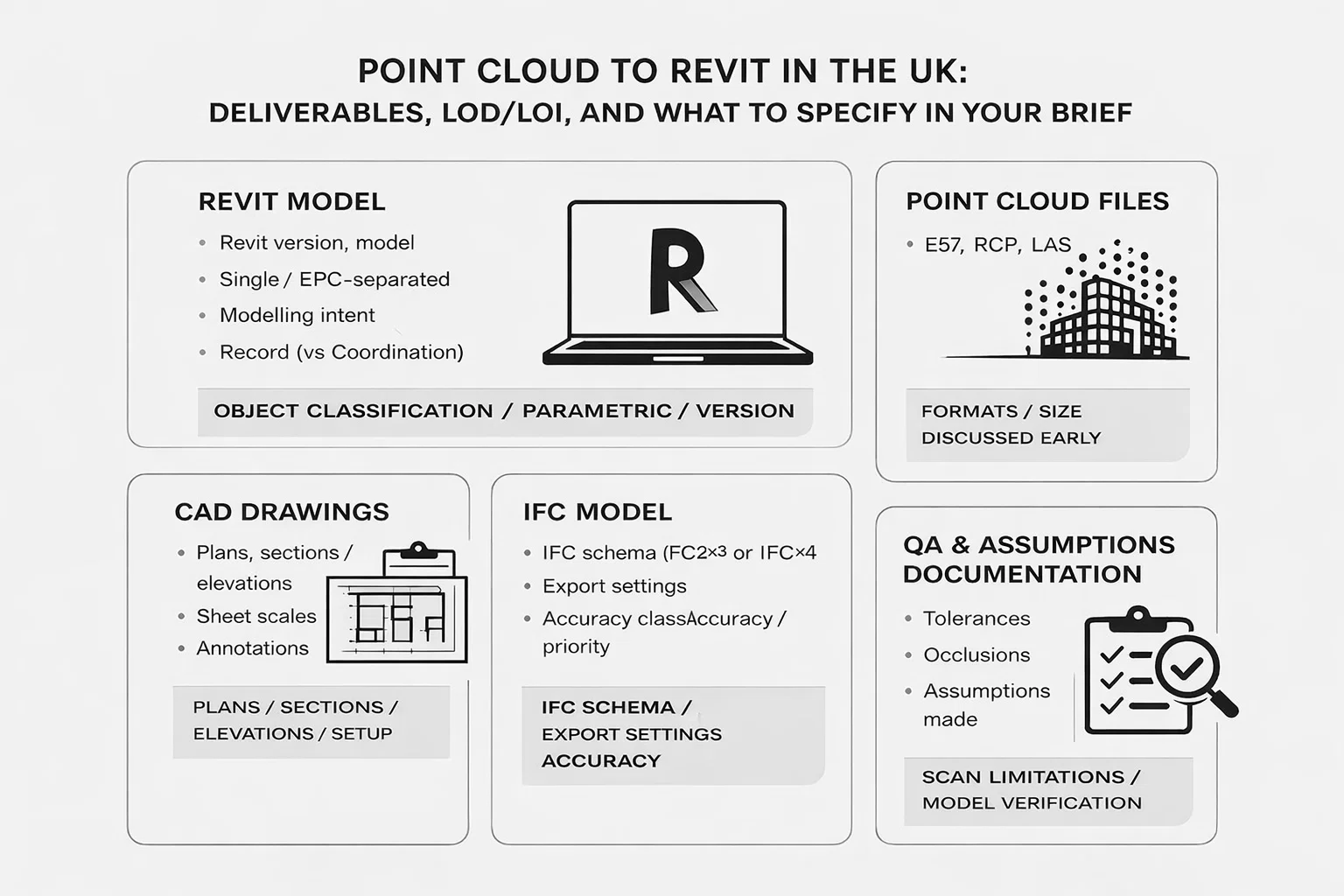
One of the most common sources of confusion is the phrase “deliverables included”. Many briefs list formats without explaining how those files are meant to be used.
In a typical UK scan to Revit BIM modelling project, you may receive some or all of the following.
Revit Model
This is the core deliverable. It may be architectural only, or split into architectural, structural, and MEP models depending on scope.
Important details to clarify:
- Revit version
- Single combined model or discipline-separated models
- Modelling intent (record vs coordination)
- Object classification level
- Whether elements are simplified or fully parametric
A Revit model can look complete while still being unsuitable for certain tasks. This is why intent matters more than appearance.
IFC Model
IFC export is common, especially where open formats are required. Not all Revit models export clean IFCs without preparation.
If IFC is required, the brief should specify:
- IFC schema (IFC2x3 or IFC4)
- Export settings
- Whether geometry accuracy or classification is the priority
Dibujos CAD
Plans, sections, and elevations are often requested alongside the model. While these are typically generated from the Revit file, they are not automatic outputs and still require definition and setup. The brief should clearly state which drawings are required, the intended sheet scales, how much dimensioning is expected, and whether the deliverables should include full annotations or geometry only. Without this clarity, drawing outputs can easily miss what the project team actually needs.
Point Cloud Files
Some teams request the registered point cloud alongside the model. This can be useful for verification or future checks.
Formats typically include E57, RCP, or LAS. These files can be large and should be discussed early.
QA and Assumptions Documentation
This is one of the most valuable but most overlooked deliverables in point cloud to Revit UK projects. A competent provider will document what could not be captured, where occlusions affected the scan, which modelling assumptions were made, how tolerances were checked, and how control and registration accuracy were verified. Without this context, teams often assume the model is more reliable or complete than it really is, which can lead to incorrect design decisions later on.
Understanding LOD and LOI in Real Projects
LOD and LOI are often cited as if they are fixed standards. In reality, they are frameworks that still require interpretation.
LOD: Level of Detail
In UK practice, scan-derived models typically fall between LOD 200 and LOD 400.
- LOD 200: Generalised geometry. Suitable for massing, spatial planning, and early design.
- LOD 300: Accurate geometry with consistent representation. Often used for design development.
- LOD 350: Interfaces and connections are more clearly defined. Common for coordination.
- LOD 400/500: Fabrication and Assembly level detail. While many providers avoid this due to complexity, Powerkh specializes in high-LOD modeling for Structural Detailing (Steel, Rebar) and MEP systems. This is essential when the existing conditions model must support prefabrication or precise on-site installation checks.
The mistake many briefs make is asking for high LOD everywhere. This increases cost and time without necessarily adding value.
A better approach is targeted LOD. For example:
- LOD 300 for primary structure and envelopes
- LOD 200 for secondary spaces
- LOD 350 only in critical coordination zones
LOI: Level of Information
LOI is even more misunderstood. In scan to Revit BIM modelling UK projects, it often matters less than geometry, but it still plays a role in how usable the model becomes. Clarifying whether elements need consistent naming, whether systems should be classified, whether asset data is required or deliberately excluded, and whether parameters are project-specific or generic helps prevent unnecessary complexity. Adding information that no one will use can make an existing conditions BIM model heavier, slower, and harder to work with. LOI should support the model’s purpose, not exceed it.
Record Model vs Coordination Model: Understanding the Difference
One of the most common points of confusion in point cloud to Revit UK projects is the assumption that all models serve the same purpose. In reality, the intent behind the model shapes how it is built, simplified, and ultimately used. The distinction between a record model and a coordination model is fundamental, and failing to define it early often leads to mismatched expectations. The table below outlines the practical differences between the two.
| Aspect | Record Model | Coordination Model |
| Primary purpose | Reference, verification, and design context | Active coordination with other BIM models |
| Relationship to point cloud | Geometry matches the point cloud within defined tolerances | Geometry is adjusted where needed to support coordination |
| Level of simplification | Elements may be simplified | Simplified, but with deliberate modelling logic |
| Connections and interfaces | Connections are not resolved beyond what is visible | Interfaces and element logic are handled consistently |
| Suitability for clash detection | Not intended for clash detection | Clean geometry suitable for clash detection |
| Treatment of uncertain data | Includes what is visible, even if ambiguous | Often excludes ambiguous or unreliable elements |
| Typical use case | Architects and planners needing reliable existing context | Teams running federated models and coordination workflows |
Why This Must Be Stated in the Brief
If the brief does not state which type of model is required, assumptions will be made. Those assumptions often differ between surveyors, modellers, and design teams.
Stating “record model for design reference” or “coordination-ready model for federated BIM” changes how the model is built from day one.
Accuracy, Tolerances, and Why They Matter More Than LOD
Many briefs focus heavily on LOD and ignore tolerances. This is backwards. A model described as LOD 300 with unclear accuracy limits is often less useful than a simpler model built to clearly defined tolerances. In UK practice, acceptable accuracy varies depending on the capture method and the type of element being modelled. Interiors captured with terrestrial laser scanning usually achieve tighter tolerances, while roofs and facades supported by UAV data tend to be looser. Topographic context typically sits at a broader tolerance range altogether.
Rather than demanding uniform precision across the entire model, it is more effective to specify acceptable deviation ranges, identify areas where tighter control is genuinely required, and allow approximation where exact accuracy adds little value. This approach keeps modelling effort focused on the parts of the building that actually influence design decisions and coordination, instead of inflating scope without improving usability.
What to Specify in Your Brief: A Practical Checklist
A good brief does not need to be long. It needs to be precise.
At a minimum, your brief should clearly state the following.
1. Purpose of the Model
Explain how the model will be used:
- Design reference
- Planning submission
- Coordinación
- Verification
- Asset understanding
This informs every modelling decision.
2. Model Type
State whether you need:
- Record model
- Coordination model
- Hybrid approach
If hybrid, define where each applies.
3. LOD and LOI by Area
Avoid blanket statements. Break it down:
- Structure
- Arquitectura
- MEP
- External context
4. Deliverables Required
List formats and outputs:
- Revit
- IFC
- CAD drawings
- Point cloud
- QA documentation
5. Coordinate System
Specify whether the model should be:
- Project internal
- OSGB36
- Site grid
This is often missed and causes downstream problems.
6. Known Constraints
Include:
- Access limitations
- Occupied areas
- Reflective or glazed surfaces
- Time restrictions
This helps set realistic expectations early.
Turnaround Guidance: What Is Realistic
Turnaround is one of the most misunderstood aspects of scan to Revit BIM modelling in the UK. While site capture is often completed quickly, the modelling stage takes significantly longer and should not be treated as an afterthought. Smaller or simpler buildings may move from capture to delivery within a few weeks, but medium-sized buildings with multiple storeys typically require more time, particularly where coordination logic is involved. Large or complex sites are often delivered in phases to keep information usable as it becomes available.
Urgent turnaround is possible, but it nearly always comes with trade-offs. Scope may need to be reduced, LOD lowered, outputs phased, or costs increased to maintain quality. A realistic programme balances speed with clarity. Models that are rushed to meet an artificial deadline often create more delays later, once design teams begin relying on them.
Common Mistakes to Avoid
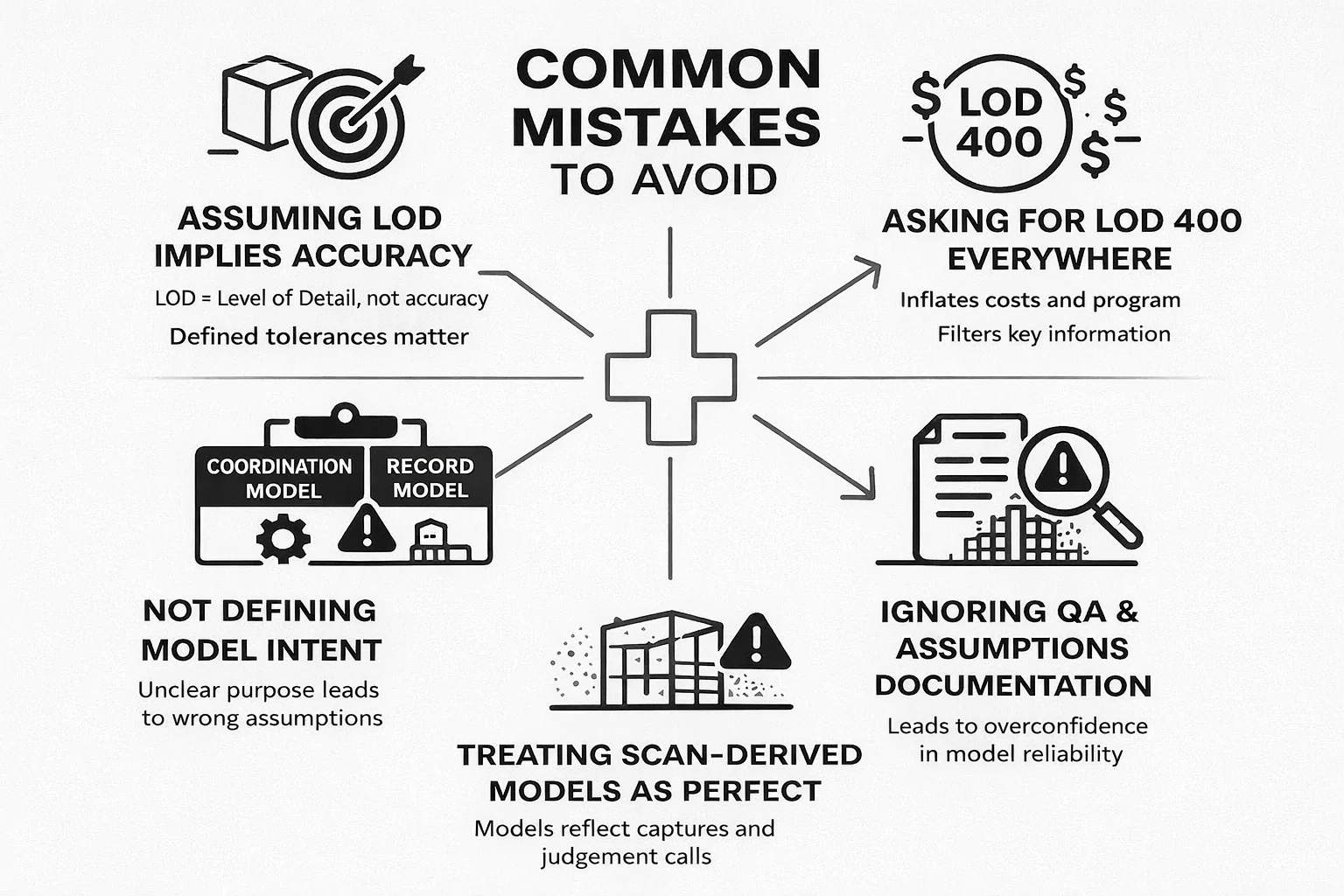
After reviewing a wide range of point cloud to Revit UK projects, the same problems tend to surface again and again. They rarely come from poor scanning or weak modelling. Most of the time, they stem from unclear expectations set at the briefing stage.
- Assuming LOD implies accuracy. LOD describes how much detail is modelled, not how accurate that geometry is. Without defined tolerances, a high LOD model can still be misleading.
- Asking for LOD 400 everywhere “just in case”. Blanket requests for high LOD inflate cost and programme without improving usability. In many areas, that level of detail adds noise rather than value.
- Not defining model intent. Failing to state whether the model is a record model or a coordination model leads to assumptions that rarely align across teams.
- Ignoring QA and assumptions documentation. Without clear notes on occlusions, limitations, and modelling assumptions, users often treat the model as more complete or reliable than it actually is.
- Treating scan-derived models as perfect representations. Point cloud-based models reflect what could be captured and interpreted, not an absolute truth. Every model contains gaps, judgement calls, and limits.
Avoiding these mistakes does not require a bigger budget or more sophisticated tools. It simply requires a clearer brief and a shared understanding of how the model will be used.
Reflexiones finales
Point cloud to Revit work in the UK is mature, capable, and widely available. The difference between a model that adds value and one that causes friction rarely comes down to technology. It comes down to clarity.
If you define what you want to receive, align LOD and LOI with real needs, choose the right model type, and allow realistic timeframes, scan to Revit BIM modelling becomes a powerful tool rather than a compromise.
The best projects are not the ones with the highest detail. They are the ones where everyone understands what the model is, what it is not, and how it should be used.
That understanding starts with the brief.
Preguntas frecuentes
What is the typical cost of point cloud to Revit services in the UK?
Costs vary widely depending on building size, access conditions, required LOD, and intended use of the model. Small or simple buildings are usually at the lower end, while multi-storey or complex sites cost more, especially if coordination-ready outputs are required. Asking for higher LOD or tight tolerances everywhere will increase cost without always adding value.
What LOD should I specify for an existing conditions BIM model?
In most UK projects, LOD 200 to 300 is sufficient for existing conditions. LOD 350 is usually reserved for specific coordination zones rather than entire buildings. Full LOD 400 across an existing structure is rarely justified unless there is a clear fabrication or specialist requirement.
Is point cloud to Revit the same as scan to Revit?
In practice, yes. In the UK, both terms are used interchangeably to describe the process of converting laser scan or photogrammetry data into a Revit BIM model. The important distinction is not the wording, but how the resulting model is intended to be used.
Can a scan-derived Revit model be used for clash detection?
It depends on how the model is built. A record model is not suitable for clash detection, even if it looks detailed. A coordination model can support clash detection, but it must be explicitly scoped and modelled with that purpose in mind. This should be stated clearly in the brief.
How accurate are point cloud to Revit models?
Accuracy depends on capture method, site conditions, and modelling scope. Interior spaces captured with terrestrial laser scanning are generally more accurate than roofs or external areas captured with UAV support. Accuracy should always be defined through tolerances rather than assumed from LOD alone.

¿Tiene un proyecto BIM? Hable con nosotros.
Contacte con nosotrosNuestros casos prácticos
Hemos gestionado más de 200 proyectos BIM y VDC para los sectores comercial, industrial y residencial.
Nuestro trabajo incluye:
Automatización del diseño de encofrados
Our client from
California, USA
Automatización del diseño de falsos techos
Our client from
New York, USA
Automatización del diseño del entramado de muros
Our client from
California, USA