Haben Sie noch Fragen? Kontaktieren Sie uns!
Kommen Sie in unser Team!
Kostenloses Angebot oder Beratung anfordern

Quick Summary: Computer-Aided Design (CAD) replaced manual construction drawing methods. Introduced commercially with AutoCAD’s commercial introduction in 1982, CAD software transformed how architects, engineers, and drafters create technical drawings, replacing pencils, T-squares, and drafting tables with digital tools that offer precision, speed, and easy modifications.
For decades, architects and engineers hunched over drafting tables armed with pencils, erasers, T-squares, and endless patience. A single mistake could mean hours of redrawing. Changes requested by clients? That meant starting over from scratch.
Then Computer-Aided Design arrived and changed everything.
According to VDCI, Computer-Aided Design (CAD) is a software program that allows users to create 2D drawings and 3D models of real-world objects. Commonly used by designers, engineers, and architects, CAD helps professionals create realistic models of products before they are physically manufactured. The construction industry in the United States, which was valued at around $2.12 trillion in 2025, has been transformed by this technology.
But what exactly made CAD the successor to manual drafting? And how did this transition reshape the construction and design industries?
The Manual Drafting Era: How Construction Drawings Were Created
Before digital technology entered the picture, construction drawings required extraordinary skill and precision. Architects and draftsmen spent years mastering manual drafting techniques that demanded steady hands and meticulous attention to detail.
The process was entirely analog. Professionals used drafting tables, parallel bars, T-squares, triangles, compasses, and technical pens. Every line had to be drawn by hand on vellum or drafting paper.
The Tools of Traditional Drafting
Manual drafting relied on a specific set of instruments. Each tool served a precise purpose in creating accurate technical drawings.
| Werkzeug | Zweck | Precision Level |
|---|---|---|
| T-Square | Creating horizontal parallel lines | Manual alignment required |
| Drafting Compass | Drawing circles and arcs | Dependent on user skill |
| Technical Pens | Creating consistent line weights | Required maintenance and refilling |
| Templates | Standard symbols and shapes | Limited to available templates |
| Erasers and Shields | Correcting errors selectively | Often damaged paper |
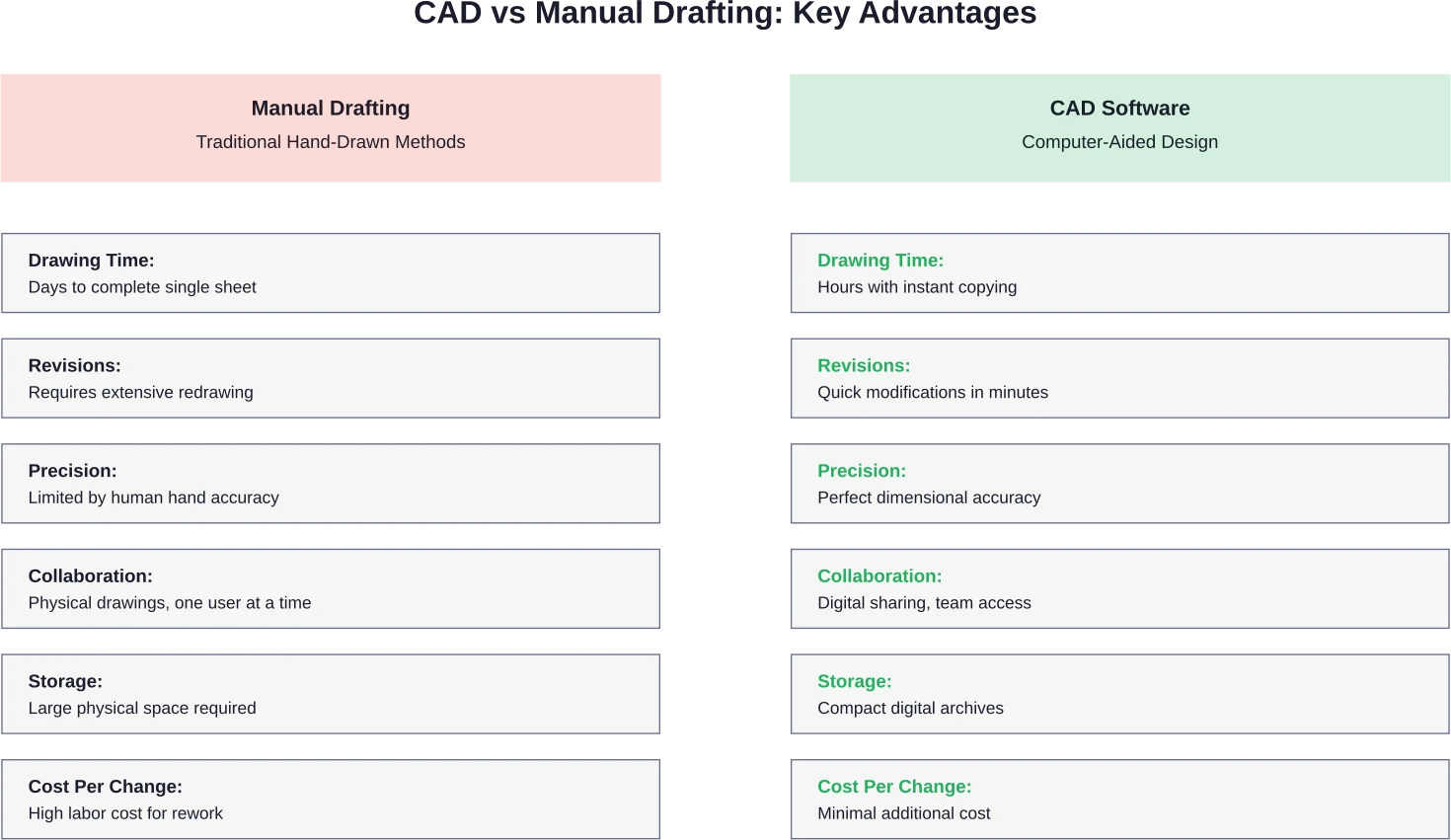
The physical nature of these tools meant that creating construction drawings was time-intensive. A single sheet could take days to complete. Revisions were particularly painful since they often required redrawing entire sections.
The Limitations That Demanded Innovation
Manual drafting had serious drawbacks. Errors were permanent unless the entire drawing was redone. Copying drawings required specialized equipment or painstaking manual reproduction.
Collaboration was difficult. Only one person could work on a drawing at a time. Sharing designs meant physically transporting drawings or creating multiple copies.
Storage presented another challenge. Large format drawings required substantial physical space. Over time, paper degraded, and drawings could be lost or damaged.
These limitations made the industry ripe for technological disruption. And that’s exactly what happened.
Computer-Aided Design: The Technology That Changed Everything
Computer-Aided Design emerged as the definitive replacement for manual construction drawing methods. This technology fundamentally transformed how design professionals approached their work.
CAD software allows users to create precise two-dimensional and three-dimensional representations of physical objects. The technology converts design concepts into digital data that computers can store, modify, and reproduce endlessly without degradation.
The Birth of Commercial CAD Software
While computer-aided design concepts existed in research settings earlier, AutoCAD’s commercial introduction in 1982 marked the beginning of widespread commercial adoption. This software brought CAD technology to personal computers, making it accessible to design firms of all sizes.
Before this breakthrough, computer-aided design systems required expensive mainframe computers that only large corporations could afford. The introduction of PC-based CAD software democratized access to digital drafting tools.
Popular CAD Software That Replaced Manual Methods
According to VDCI, popular types of CAD software companies use include SolidWorks, Inventor, Revit, AutoCAD, Civil 3D, MicroStation, CATIA, Creo, and Siemens NX. Each of these platforms serves specific industries and design needs.
AutoCAD dominated early adoption in architecture and construction. SolidWorks became the standard for mechanical engineering. Revit later introduced Building Information Modeling capabilities that extended beyond traditional drafting.
These software platforms shared common features that made them superior to manual drafting. They allowed precise dimensional accuracy, easy modifications, infinite copying without quality loss, and digital collaboration across distances.
Bring in Powerkh for BIM Delivery Work

Powerkh helps project teams with the technical side of BIM and VDC delivery. Its services include modeling, coordination, Scan to BIM, automation, prefabrication support, and structural detailing. For companies that need extra production capacity, the company can support active projects with models, drawings, and related documentation.
Need Extra BIM Capacity on a Project?
Talk with Powerkh to:
- develop models and drawings for ongoing work
- handle point cloud to BIM conversion
- support detailing, coordination, and fabrication-related tasks
👉 Contact Powerkh for a project review and consultation.
Why CAD Replaced Manual Drafting: The Decisive Advantages
The transition from manual to computer-aided design wasn’t just about keeping up with technology trends. CAD offered tangible, measurable benefits that transformed productivity and quality.
Speed and Efficiency Gains
CAD dramatically reduced the time required to create construction drawings. What once took days could be completed in hours. Repetitive elements could be copied instantly rather than redrawn.
Changes that would have required complete redrawing could now be made in minutes. Architects could generate multiple design iterations quickly, allowing clients to see more options.
This speed advantage translated directly to cost savings. Design firms could handle more projects with the same staff. Faster turnaround times improved cash flow and client satisfaction.
Precision and Accuracy
Computer-aided design eliminated human error in measurements and calculations. Dimensions could be specified to multiple decimal places with perfect consistency.
The software automatically maintained scale relationships. Geometric constraints ensured that design elements remained properly aligned and proportioned.
This precision reduced costly construction errors that resulted from misinterpreted or inaccurate drawings. Contractors could trust the dimensions on CAD drawings in ways that manual drawings couldn’t guarantee.
Easy Modifications and Revisions
Perhaps the most transformative advantage was how CAD handled changes. In manual drafting, revisions were dreaded because they often meant extensive redrawing.
With CAD, modifications became simple. Move a wall, and doors, windows, and dimensions update automatically. Change a dimension, and related elements adjust accordingly.
This flexibility encouraged better design exploration. Designers could experiment with alternatives without fear of wasting hours on drawings that might be discarded.
Verbesserte Zusammenarbeit
Digital files transformed how teams worked together. Multiple professionals could access the same drawing files simultaneously from different locations.
CAD drawings could be shared electronically, eliminating shipping delays. Consultants in different cities could review and mark up the same documents in real time.
Version control became manageable. Rather than tracking which physical drawing was the latest revision, software could manage versions and maintain change histories.
Better Storage and Documentation
Digital storage solved the physical space problem. Thousands of drawings could be stored on a single hard drive rather than filling filing cabinets and plan rooms.
Digital files don’t degrade over time like paper. Backups could be created effortlessly, protecting against loss from fire, water damage, or simple misplacement.
Searching and retrieval became instant. Finding a specific detail in a set of hundreds of drawings went from hours of manual searching to seconds of digital searching.
The Impact on the Construction Industry
The adoption of Computer-Aided Design reshaped the construction industry fundamentally. The changes extended beyond just the drawing process itself.
Career Changes and New Opportunities
According to South Florida State College, job positions requiring AutoCAD software include project managers, mechanical engineers, and CAD drafters. Based on data from South Florida State College and Payscale, the average project manager salary is $97,180, the average mechanical engineer salary is $90,160, and the average CAD drafter salary is $57,960.
The transition created demand for new skills. Professionals had to learn software operation rather than just manual drafting techniques. Educational institutions adapted by incorporating CAD training into their programs.
According to Oakton Community College, mechanical design and CAD certificate programs now prepare students for rewarding careers in drafting and design technology, with coursework designed to build expertise in computer-aided design and mechanical design principles across industries like manufacturing, engineering, and industrial design.
Project Delivery Transformation
CAD enabled faster project delivery. Design development that once took months could be compressed to weeks. This acceleration affected project timelines throughout the industry.
Coordination between disciplines improved. Structural engineers, mechanical engineers, and architects could overlay their CAD drawings to identify conflicts before construction began. This reduced costly field changes.
Clients gained better visualization tools. Three-dimensional CAD models helped non-technical stakeholders understand proposed designs more clearly than two-dimensional drawings ever could.
Quality and Error Reduction
The precision of CAD drawings reduced construction errors. Dimensions were consistent and accurate. Details could be enlarged without losing clarity.
Automated checking tools could identify certain types of errors that might slip through manual review. Clash detection software could spot where building systems conflicted.
The ability to create accurate quantity takeoffs directly from CAD drawings improved cost estimating. This led to more accurate bids and fewer cost overruns.
Beyond Basic CAD: The Evolution Continues
Computer-Aided Design was just the beginning. The technology continued evolving, introducing capabilities that extended far beyond replacing manual drafting.
Gebäudedatenmodellierung (BIM)
Building Information Modeling emerged as the next evolution beyond traditional CAD. BIM extends computer-aided design by adding data to geometric elements.
Rather than just lines representing a wall, BIM creates intelligent objects that know they’re walls. These objects contain information about materials, cost, performance characteristics, and relationships to other building elements.
BIM enables deeper analysis. Energy modeling, structural analysis, and cost estimating can all draw from the same model. This integration provides insights impossible with traditional CAD drawings.
Parametric and Generative Design
Modern CAD software introduced parametric modeling. This approach defines relationships between design elements so that changes propagate automatically throughout the model.
Generative design takes this further by using algorithms to create design options based on specified constraints. The software can generate hundreds of alternatives that meet performance criteria, allowing designers to select the best option.
Artificial Intelligence Integration
According to the American Institute of Architects’ 2025 research, artificial intelligence is no longer a future trend but is already woven into the fabric of professional practice.
AI agents now autonomously handle routine design compliance, structural optimization, and real-time permit verification in standard architectural workflows. According to research published in Automation in Construction, AI applications for structural design automation are expanding, with 134 articles reviewed on the application of AI in structural design, identifying two primary areas and six subfields within AI’s design applications.
These AI capabilities represent the latest evolution in the journey that began when CAD replaced manual drafting. The trend continues toward greater automation, intelligence, and integration.
Industries That Rely on CAD Technology
While construction and architecture drove early CAD adoption, the technology spread across numerous industries. Each sector found unique applications for computer-aided design capabilities.
Architektur und Bauwesen
Architecture remains one of the primary users of CAD software. From initial concept sketches to detailed construction documents, architects rely on digital design tools for virtually every project phase.
Construction firms use CAD for shop drawings, fabrication details, and construction planning. The technology has become so integral that manual drafting has essentially disappeared from modern architectural practice.
Herstellung und Produktdesign
Manufacturing adopted CAD extensively for product design and development. Engineers use software like SolidWorks, Inventor, and CATIA to design everything from consumer products to aerospace components.
CAD models feed directly into computer-aided manufacturing (CAM) systems. This integration allows seamless transition from design to production, reducing errors and speeding time-to-market.
Civil Engineering and Infrastructure
Civil engineers use specialized CAD software like Civil 3D for infrastructure projects. Roads, bridges, water systems, and land development all rely on computer-aided design.
The technology handles the complex calculations required for grading, drainage, and earthwork. Three-dimensional terrain modeling provides capabilities impossible with manual methods.
Mechanical and Electrical Systems
Mechanical, electrical, and plumbing (MEP) engineers use CAD to design building systems. The software manages the complexity of routing pipes, ducts, and conduits through confined spaces.
Coordination between systems happens digitally before construction begins. This prevents the conflicts that plagued projects when different trades worked from separate manual drawings.
| Industry | Primary CAD Applications | Common Software |
|---|---|---|
| Architektur | Building design, construction documents | AutoCAD, Revit, ArchiCAD |
| Maschinenwesen | Product design, machine design | SolidWorks, Inventor, Creo |
| Bauingenieurwesen | Infrastructure, site development | Civil 3D, MicroStation |
| Aerospace | Aircraft and spacecraft design | CATIA, Siemens NX |
| Automotive | Vehicle design and engineering | CATIA, Siemens NX, Creo |
| Herstellung | Product development, tooling | SolidWorks, Inventor |
Learning CAD: The Modern Path
The shift to CAD changed how design professionals are trained. Educational programs had to adapt to prepare students for digital workflows rather than manual drafting techniques.
Educational Programs and Certification
Many institutions now offer CAD training programs. According to VDCI, self-paced online CAD classes allow students to find the right training to fit their needs, with courses taught by expert instructors in the architecture, engineering, and construction industry.
Community colleges and technical schools provide certificate programs focused on CAD skills. These programs typically include hands-on training with industry-standard software.
University programs integrate CAD instruction into broader engineering and architecture curricula. Students learn both design theory and the software tools used to implement designs.
Skills Required for CAD Proficiency
CAD proficiency requires different skills than manual drafting. Technical knowledge of the software interface and commands is essential. Understanding how to navigate three-dimensional space digitally takes practice.
Design fundamentals remain important. CAD is a tool, not a replacement for understanding design principles, engineering concepts, or architectural theory.
Problem-solving abilities matter. When software doesn’t behave as expected, users need to troubleshoot issues and find alternative approaches.
The Value of Manual Drafting Knowledge
Interestingly, understanding manual drafting principles still provides value. The spatial reasoning and visualization skills developed through manual drafting translate well to CAD work.
Many experienced professionals argue that learning basic manual drafting helps students understand what CAD software is actually doing behind the scenes. This foundation can lead to more effective use of digital tools.
Challenges in the Transition to CAD
While CAD offered clear advantages, the transition from manual drafting wasn’t without difficulties. Organizations faced real challenges in making the switch.
Initial Investment Costs
CAD software required significant upfront investment. Hardware capable of running design software was expensive. Software licenses added substantial ongoing costs.
Small firms sometimes struggled to justify the investment, especially when manual methods still worked. The return on investment wasn’t immediate.
Training costs added to the expense. Staff needed time to learn new software, during which productivity often decreased temporarily.
Learning Curve and Resistance
Professionals who had spent decades perfecting manual drafting skills sometimes resisted the change. The transition meant abandoning familiar tools and methods.
Early CAD software could be frustrating to use. Interfaces weren’t always intuitive. Technical problems and software crashes caused lost work and frustration.
Generational divides sometimes emerged in firms. Younger employees adapted to CAD quickly while senior professionals struggled, creating tension and workflow challenges.
Technical Limitations of Early Systems
Early CAD systems had real limitations. Computing power was limited, making complex drawings slow to manipulate. File sizes could overwhelm available storage.
Printing large-format drawings required expensive plotters. The quality of early CAD output sometimes didn’t match hand-drawn work.
Software compatibility issues plagued the industry. Different CAD programs couldn’t always exchange files reliably, creating coordination problems.
The Current State: CAD as the Standard
Today, Computer-Aided Design has become so standard that discussing alternatives seems anachronistic. Manual drafting exists primarily as a teaching tool or for specialized applications.
Universal Adoption Across Industries
CAD is now the expected tool for creating construction drawings and technical designs. Firms that don’t use computer-aided design are exceptionally rare.
Client expectations assume digital delivery. Contractors expect electronic drawing sets. Building departments often prefer or require digital submissions.
The economic advantages have become overwhelming. Firms using manual methods simply can’t compete on speed, cost, or capabilities with those using CAD.
Cloud-Based Collaboration
Modern CAD has moved beyond desktop software to cloud-based platforms. These systems enable real-time collaboration with team members anywhere in the world.
Cloud storage eliminates concerns about local hardware failures. Automatic backups protect work continuously. Version control happens automatically rather than through manual file naming conventions.
Mobile access allows reviewing and marking up drawings from tablets and smartphones. This flexibility supports field work and remote collaboration.
Integration With Other Technologies
CAD now integrates with numerous other technologies. Virtual reality allows immersive walkthroughs of designs before construction. Augmented reality overlays digital models onto physical construction sites.
Drones capture existing conditions that feed into CAD models. 3D scanning creates precise digital representations of buildings and sites.
These integrations create workflows that would be impossible with manual drafting, continuing to expand the advantages of digital design.
Looking Forward: What Comes After CAD?
Just as CAD replaced manual drafting, current technologies suggest further evolution is underway. The next generation of design tools is already emerging.
Artificial Intelligence and Automation
AI is beginning to automate routine aspects of design work. The American Institute of Architects noted in a 2025 article that engaging with AI empowers architects to shape the future of the profession, with the technology already woven into daily practice.
Generative design algorithms can produce design options automatically based on specified criteria. This doesn’t replace human designers but augments their capabilities.
Machine learning analyzes past projects to suggest solutions for new ones. Pattern recognition identifies potential problems earlier in the design process.
Virtuelle und erweiterte Realität
VR and AR technologies are transforming how designers and clients experience proposed buildings. Rather than interpreting two-dimensional drawings, stakeholders can virtually walk through spaces before construction.
These technologies provide intuitive understanding that even the best CAD renderings can’t match. Design review becomes more effective when people can experience scale and spatial relationships directly.
Digital Twins and Smart Buildings
Digital twins create living models of buildings that update throughout their lifecycle. The CAD model doesn’t end at construction but continues as an operational tool.
Sensors in buildings feed real-time data back to the digital model. This enables predictive maintenance, energy optimization, and space utilization analysis.
This represents another evolution beyond basic CAD, adding intelligence and real-world connection to digital models.
Häufig gestellte Fragen
What technology replaced manual drafting in construction?
Computer-Aided Design (CAD) replaced manual drafting. CAD software allows professionals to create precise digital drawings and models, replacing traditional tools like pencils and drafting tables.
When did CAD replace manual drafting?
The transition occurred mainly during the 1980s and 1990s. AutoCAD’s introduction in 1982 made CAD accessible to a wider market, and by the mid-1990s it had become the industry standard.
What are the main advantages of CAD over manual drafting?
CAD enables faster drawing creation, higher precision, easy editing, duplication of elements, digital collaboration, and efficient storage. These advantages significantly improve productivity and reduce errors.
What CAD software is most commonly used in construction?
Popular tools include AutoCAD for drafting, Revit for BIM-based building design, Civil 3D for infrastructure, and MicroStation for large-scale projects. Other programs include SolidWorks, Inventor, and CATIA.
Do architects and engineers still need to learn manual drafting?
Manual drafting is not required in practice, but it is often taught to build spatial understanding and visualization skills that improve digital design abilities.
How much do CAD professionals earn?
Salaries vary by role and experience. CAD drafters, engineers, and project managers earn different ranges, with higher compensation for advanced technical roles and leadership positions.
What comes after CAD in design technology evolution?
BIM represents the next step, adding data and intelligence to design models. Emerging technologies like AI, VR/AR, and digital twins continue to evolve the design process beyond traditional CAD.
Schlussfolgerung
Computer-Aided Design definitively replaced manual construction drawing methods. What began with AutoCAD’s commercial introduction in 1982 has evolved into an entire ecosystem of digital design tools that have transformed architecture, engineering, and construction industries.
The advantages were too significant to ignore. Speed, precision, easy modifications, better collaboration, and efficient storage made CAD superior to manual drafting in virtually every measurable way. While the transition faced challenges, the benefits far outweighed the difficulties.
CAD didn’t just replace manual drafting. It enabled entirely new capabilities that manual methods could never provide. Three-dimensional modeling, automated analysis, real-time collaboration, and integration with other technologies have expanded design possibilities.
And the evolution continues. Building Information Modeling, artificial intelligence, and immersive technologies represent the next chapters in the story that began when computer-aided design replaced pencils and T-squares.
For anyone entering design fields today, CAD proficiency isn’t optional. It’s the foundation of modern practice. Whether pursuing careers as architects, engineers, or drafters, digital design skills are essential. The construction industry valued at $2.12 trillion relies on these technologies, and that dependence will only deepen as new capabilities emerge.
Ready to develop CAD skills? Check current educational programs and certification options to start building expertise in the technology that transformed an industry.

Unsere Fallstudien
Wir haben mehr als 200 BIM- und VDC-Projekte für Gewerbe, Industrie und Wohnungsbau durchgeführt.
Unsere Arbeit umfasst:
Automatisierung der Schalungsplanung
Our client from
California, USA
Automatisierung von abgehängten Decken
Our client from
New York, USA
Automatisierung von Wandkonstruktionen
Our client from
California, USA


