Haben Sie noch Fragen? Kontaktieren Sie uns!
Kommen Sie in unser Team!
Kostenloses Angebot oder Beratung anfordern

In construction, RCP stands for Reflected Ceiling Plan, a technical drawing that shows a top-down view of the ceiling as if it were reflected onto a mirror placed on the floor. It documents ceiling elements like light fixtures, HVAC vents, sprinklers, and other mounted components, serving as a critical guide for contractors and subcontractors during installation.
Walk onto any construction site, and somewhere among the blueprints and architectural drawings, there’s a document that looks at the building from an unusual angle. Instead of showing walls or foundations, it reveals what’s overhead.
RCP stands for Reflected Ceiling Plan. It’s a drawing that depicts the ceiling as though a mirror were placed on the floor, reflecting everything above. Architects and engineers use this view to map out light fixtures, air vents, sprinkler heads, speakers, and other ceiling-mounted elements.
But here’s the thing—RCPs aren’t just about showing where lights go. They’re construction documents that coordinate multiple trades, prevent conflicts between systems, and ensure the finished ceiling matches design intent.
Understanding the Reflected Ceiling Plan Concept
The term “reflected” describes the viewing perspective. Imagine standing in a room and looking down at a perfect mirror on the floor. Everything on the ceiling would appear in that reflection, maintaining its spatial relationships but shown from below.
This top-down view is actually more intuitive for construction purposes than trying to draw the ceiling from a person’s normal viewing angle. Floor plans already establish the room layout, so RCPs use the same orientation and scale, making it easier to coordinate between drawings.
Reflected ceiling plans typically include dimensions, grid lines that match the floor plan, and detailed annotations about ceiling heights, materials, and construction methods.
What Elements Appear on an RCP
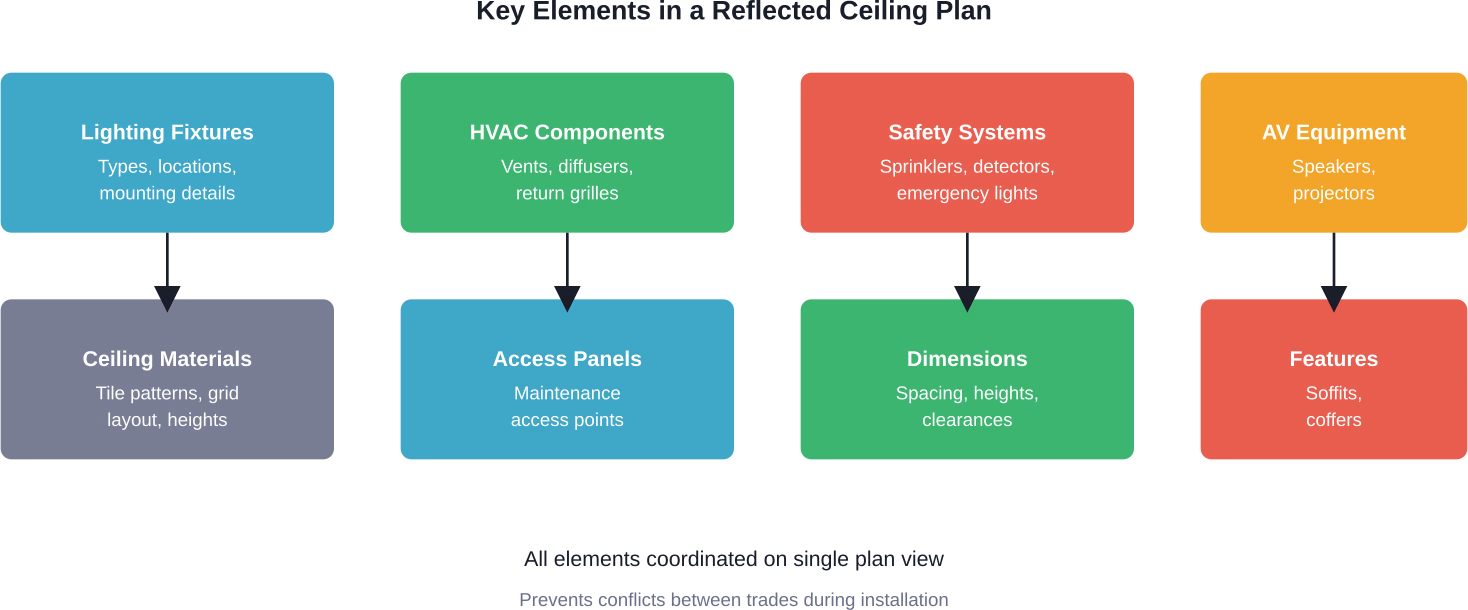
These plans document numerous ceiling components:
- Light fixtures with specific types and mounting details
- HVAC supply and return vents with airflow specifications
- Fire sprinkler heads and emergency lighting
- Speakers, projectors, and audiovisual equipment
- Ceiling tile patterns and suspended ceiling grids
- Access panels for maintenance
- Smoke detectors and sensors
- Architectural features like coffers, soffits, or bulkheads
According to discussions on the AIA Community Hub, architects may provide RCPs alongside floor plans and duct layouts when transmitting CAD files to contractors, though practices vary regarding which files are shared.
Why Construction Teams Rely on RCPs
Multiple trades work on ceiling installations—electricians, HVAC technicians, sprinkler fitters, and acoustical ceiling installers. Without coordination, conflicts emerge. An HVAC duct might block a light fixture location, or a sprinkler head might interfere with a speaker.
RCPs prevent these problems by showing all ceiling elements simultaneously. Contractors can identify conflicts before ordering materials or beginning installation work.
The plans also establish ceiling heights throughout the building. Rooms might have different ceiling elevations, and dropped soffits or bulkheads create variations within single spaces. RCPs document these changes with precision.
The Difference Between RCPs and Floor Plans
Floor plans and reflected ceiling plans share the same spatial orientation and scale, but they document different aspects of the building:
| Aspect | Floor Plan | Reflected Ceiling Plan
|
|---|---|---|
| Primary Focus | Walls, doors, windows, furniture layout | Ceiling fixtures, grids, heights, materials |
| Viewing Angle | Looking down at floor level | Looking up at ceiling (mirrored view) |
| Key Elements | Room dimensions, circulation paths | Lighting, HVAC, sprinklers, ceiling finish |
| Trade Use | Framing, general construction | Electrical, mechanical, ceiling installers |
RCP in Different Project Types
The complexity of reflected ceiling plans varies dramatically based on building type. A simple residential project might have minimal ceiling elements—perhaps recessed lights and a few vents.
Commercial and institutional buildings demand far more detailed RCPs. Office buildings typically feature suspended ceiling grids with integrated lighting, HVAC diffusers, and extensive fire protection systems. Healthcare facilities add medical gas outlets, specialized lighting, and patient monitoring equipment to ceiling plans.
Industrial projects sometimes require the most complex coordination, with heavy mechanical systems, high-bay lighting, and specialized ventilation all competing for ceiling space.
Creating and Reading RCPs
Architects typically produce reflected ceiling plans using CAD software or BIM platforms. The process starts with the floor plan as a base reference, then adds ceiling-specific information layer by layer.
Standard architectural symbols represent different elements. Light fixtures appear as specific shapes indicating fixture type—recessed cans, linear LEDs or fluorescent fixtures have distinct representations. HVAC components use different symbols to distinguish supply vents from return grilles.
Dimensions on RCPs often reference grid lines, which can assist coordination with structural systems and suspended ceiling installations. This becomes critical when ceiling layouts must align across multiple rooms or corridors.
Common RCP Symbols and Notations
Reading an RCP requires familiarity with standard architectural conventions. Ceiling heights appear as notes with elevation markers. Grid lines show spacing for suspended ceiling systems at varying intervals depending on design requirements.
Dashed lines often indicate soffits, bulkheads, or ceiling height changes. Solid lines might represent walls that extend to the ceiling or structural elements that penetrate the ceiling plane.
Get Your RCP Ready for Installation

RCP issues don’t show up on drawings – they show up above the ceiling during installation. Misaligned grids, missing space for services, and blocked access points slow everything down and force rework. Powerkh helps you resolve those problems before work starts by aligning ceiling layouts with structure, MEP systems, and real installation conditions. They focus on making sure RCP decisions hold up when different trades come together in the same space. That means fewer surprises in congested zones and a ceiling layout that can actually be installed without constant adjustments.
Choose Powerkh for RCP That Works
What sets their approach apart:
- Focus on high-risk ceiling zones where trades compete for space
- Early visibility into conflicts that aren’t obvious on 2D drawings
- Engineering-led checks, not just model coordination
- Clear input for design decisions before they reach site
- Support through both design and construction, not just one stage
Contact Powerkh to make sure your ceiling design works when installation begins, not after problems show up.
RCP Files and Digital Collaboration
Modern construction increasingly involves digital file sharing. Subcontractors often request electronic copies of RCPs for coordination and shop drawing preparation.
According to community discussions among architectural professionals, firms typically provide CAD files of RCPs along with overall lighting plans and duct layouts to contractors. However, standard practice includes specific contract language about digital file use, ensuring contractors maintain responsibility for field verification and building layout accuracy.
The architectural files serve as a reference, but contractors still verify dimensions and conditions on-site. Sending details and sections provides less benefit than base plans, which is why many firms limit digital file transmission to essential coordination drawings like RCPs.
As-Built RCPs and Facility Management
Construction never proceeds exactly as planned. Field conditions require adjustments, and contractors make minor modifications during installation. Once construction completes, as-built RCPs document the actual installed conditions.
These updated drawings become crucial for facility management. Building operators reference as-built RCPs when planning renovations, troubleshooting systems, or locating specific equipment above the ceiling. Without accurate as-built documentation, maintenance teams waste time searching for components or risk damaging systems during ceiling access.
The distinction between design RCPs and as-built RCPs matters significantly for existing buildings. Renovation projects may utilize laser scanning to capture current conditions, which can support the creation of accurate as-built RCPs.
Common Mistakes and Best Practices
Several issues frequently arise with reflected ceiling plans. Failing to coordinate RCPs with structural drawings leads to conflicts—a beam might occupy space where the RCP shows a light fixture.
Another common problem involves ignoring code requirements. Fire-rated ceiling assemblies have specific construction methods, and penetrations for lights or vents must maintain the rated assembly. RCPs should note these conditions clearly.
Scale inconsistencies between floor plans and RCPs create confusion. Both drawings must use identical scales and grid references to ensure proper alignment.
Best practices include regular coordination meetings where all trades review RCPs together, identifying potential conflicts before they occur on-site. BIM workflows enhance this process by creating three-dimensional models that automatically flag spatial conflicts between ceiling systems.
Final Thoughts on Construction RCPs
Reflected ceiling plans serve as essential coordination tools that prevent costly conflicts and ensure proper installation of complex ceiling systems. These drawings translate design intent into buildable reality, guiding multiple trades through the intricate process of ceiling construction.
Understanding RCPs means recognizing them as more than simple fixture locations. They’re comprehensive documents that integrate structural, mechanical, electrical, and architectural systems into a cohesive ceiling design.
For construction professionals working with building projects of any complexity, mastering the interpretation and use of reflected ceiling plans remains a fundamental skill that directly impacts project success and quality outcomes.
Häufig gestellte Fragen
What does RCP stand for in construction documents?
RCP stands for Reflected Ceiling Plan, a drawing showing the ceiling as if viewed in a mirror placed on the floor. It documents all ceiling-mounted elements including lights, vents, sprinklers, and architectural features.
How is an RCP different from a regular ceiling plan?
The terms are often used interchangeably, but “reflected” specifically describes the mirrored viewing perspective. This top-down view matches floor plan orientation, making coordination between drawings more intuitive for construction teams.
Who uses reflected ceiling plans on a construction project?
Electrical contractors reference RCPs for light fixture installation, HVAC technicians use them for vent placement, sprinkler fitters coordinate fire protection systems, and ceiling installers follow them for grid layout and tile patterns. General contractors use RCPs to coordinate all these trades.
Are RCPs required for all construction projects?
Simple residential projects sometimes omit formal RCPs if ceiling elements are minimal. Commercial, institutional, and industrial buildings typically require detailed RCPs as part of the construction document set due to complex ceiling systems requiring coordination.
What software creates reflected ceiling plans?
AutoCAD and Revit are common platforms for RCP production. BIM software like ArchiCAD or Vectorworks also generates reflected ceiling plans. Some specialty programs focus specifically on lighting design or ceiling system layout.
Can contractors modify the RCP during construction?
Field conditions sometimes require adjustments to ceiling layouts. Contractors must submit proposed changes through the standard RFI process for architect review and approval. Significant modifications need engineering analysis to ensure code compliance and system performance.
How do as-built RCPs differ from design RCPs?
Design RCPs show intended ceiling layouts based on construction documents. As-built RCPs document actual installed conditions after construction completes, reflecting field modifications and final equipment locations. Facility managers rely on as-built RCPs for maintenance and future renovations.

Unsere Fallstudien
Wir haben mehr als 200 BIM- und VDC-Projekte für Gewerbe, Industrie und Wohnungsbau durchgeführt.
Unsere Arbeit umfasst:
Automatisierung der Schalungsplanung
Our client from
California, USA
Automatisierung von abgehängten Decken
Our client from
New York, USA
Automatisierung von Wandkonstruktionen
Our client from
California, USA


