هل لديك أي أسئلة؟ اتصل بنا!
انضم إلى فريقنا!
اطلب عرض أسعار أو استشارة مجانية

Revit and AutoCAD serve fundamentally different purposes in AEC workflows. AutoCAD excels at 2D drafting and precise technical drawings, while Revit is a BIM tool that creates intelligent 3D models with embedded data. Most design firms use both—Revit for coordinated building models and AutoCAD for legacy files, detailing, and specialized drafting tasks.
The debate around Revit vs AutoCAD isn’t really about which software is better. It’s about understanding what each tool was built to do and how that aligns with your project needs.
AutoCAD has been the drafting standard since the 1980s. It’s precise, flexible, and built for creating 2D drawings with absolute control over every line. Revit arrived later with a different philosophy: instead of drawing a building, you model it. And that model contains data—materials, costs, schedules, quantities—that can be queried, analyzed, and coordinated across disciplines.
According to Autodesk’s official website, AutoCAD is primarily used as a drafting tool with broad application across industries, while Revit is a building-specific design and documentation solution designed for BIM workflows. The two softwares are now both available in the Architecture, Engineering & Construction Collection.
Here’s the thing though—most firms don’t pick one and abandon the other. They use both. The question isn’t really Revit or AutoCAD. It’s when to use which, and how they fit into a coordinated workflow.
What Is AutoCAD?
AutoCAD is a general-purpose CAD platform built for precision drafting and design. It handles 2D drawings exceptionally well and includes basic 3D modeling capabilities.
Engineers, architects, manufacturers, and construction professionals use AutoCAD to create detailed technical drawings, schematics, and plans. It’s not tied to any specific industry or workflow, which makes it incredibly versatile.
Key strengths include:
- Absolute control over linework and geometry
- Fast 2D drafting with extensive customization
- Broad file compatibility across industries
- Lightweight files that are easy to share and edit
- Flexible annotation and dimensioning tools
AutoCAD doesn’t know what a wall is. It knows what a line is. That distinction matters when you’re trying to coordinate a multi-discipline building project, but it’s irrelevant if you’re drafting a site plan or a mechanical detail.
The software has evolved significantly over the years, adding industry-specific toolsets like AutoCAD Architecture and AutoCAD MEP. But at its core, it remains a drafting tool—not a building information system.
What Is Revit?
Revit is Autodesk’s Building Information Modeling platform. It’s not a drafting tool. It’s a model-based design system where every element—walls, doors, windows, ducts, pipes—carries data and relationships.
When using Revit, you’re not drawing a floor plan. You’re building a virtual representation of the building. The floor plans, sections, elevations, and schedules are all generated from that single model. Change a wall in the plan view, and it updates everywhere automatically.
According to the official Autodesk website, BIM is an intelligent 3D model-based process that gives architecture, engineering, and construction professionals the tools to plan, design, construct, and manage buildings more efficiently.
Revit’s core capabilities include:
- Parametric modeling with intelligent building components
- Multi-discipline coordination (architecture, structure, MEP)
- Automated schedules, quantities, and documentation
- كشف التصادم وسير عمل التنسيق والكشف عن التصادم
- Energy analysis and carbon assessment tools (integrated with Forma)
The trade-off? Less flexibility in how elements behave. A wall in Revit has properties, constraints, and relationships. You can’t just draw a random line and call it a wall. That rigidity enables coordination, but it also means a steeper learning curve and less freedom for one-off details.
Work With a BIM and VDC Services Team

باورخ provides BIM modeling, coordination, Scan to BIM, BIM automation, and structural detailing. The company works on the delivery side of construction projects, producing models, drawings, and technical documentation that teams use during design and build.
Need BIM Support for a Project?
Talk with Powerkh to:
- build BIM models and construction documentation
- prepare drawings for fabrication and site use
- support coordination across project teams
👉 Contact Powerkh for a project review and consultation.
Revit vs AutoCAD: Key Differences That Actually Matter
Real talk: the difference between Revit and AutoCAD shows up most clearly in workflow, not in feature lists.
Modeling Philosophy
AutoCAD operates on a drawing-based approach. You create views—plans, elevations, sections—as separate drawings. If you change something in one view, you manually update the others.
Revit uses a model-based approach. There’s one building model. All views are live representations of that model. Change it once, and every view, schedule, and sheet updates automatically.
This is the fundamental divide. It’s not about which is more powerful. It’s about whether your project benefits from a single source of truth or needs the flexibility of independent drawings.
File Structure and Collaboration
AutoCAD files are typically single drawings or collections of drawings organized by discipline or sheet. Coordination happens through xrefs (external references) and manual overlay.
Revit projects are centralized models stored in a single file or workshared on a server. Multiple users can work in the same model simultaneously, with changes syncing in near real-time. Clash detection and coordination happen within the model itself.
For large projects with multiple disciplines, Revit’s worksharing and coordination tools are built for the job. For smaller projects or single-discipline work, AutoCAD’s simplicity can actually be faster.
Data and Intelligence
AutoCAD elements are geometry. A line is a line. A circle is a circle. You can assign properties through layers and blocks, but there’s no inherent intelligence.
Revit elements are parametric objects. A door knows it’s in a wall. It knows its size, material, fire rating, cost, and manufacturer. You can query this data, generate schedules, and run analysis.
If your deliverables include material takeoffs, equipment schedules, or energy modeling, Revit handles that natively. AutoCAD requires external tools or manual extraction.
منحنى التعلم
AutoCAD is faster to pick up for basic drafting tasks. The interface is straightforward, and you can start producing useful drawings within days of training.
Revit demands more upfront investment. You need to understand families, constraints, worksets, and the BIM methodology. Community discussions consistently mention the steeper learning curve, but also note that once teams are proficient, production efficiency increases significantly.
According to academic programs like Carnegie Mellon’s Advanced CAD, BIM, and 3D Visualization course, students are introduced to both AutoCAD 3D and Revit Architecture as part of comprehensive design training, reflecting industry needs for both tools, reflecting the industry reality that both tools have distinct roles.
Real-World Use Cases: When to Use Which
This is where theory meets practice. Here’s when each tool makes sense based on actual project workflows.
Use AutoCAD When:
- You’re working on 2D site plans, civil drawings, or landscape architecture
- The project involves legacy files or requires DWG compatibility
- You need absolute control over linework and annotation styles
- You’re drafting mechanical or electrical details that don’t require coordination
- The scope is small and doesn’t justify BIM overhead
Use Revit When:
- The project requires multi-discipline coordination (architecture, structure, MEP)
- You need automated schedules, quantities, or material takeoffs
- BIM deliverables are contractually required
- The design involves complex geometry or parametric relationships
- You’re working on large institutional, commercial, or infrastructure projects
But wait. Many projects use both. Revit handles the building model and coordination. AutoCAD handles site work, custom details, and annotations that Revit struggles with. According to community discussions on workflow preferences, professionals often complete core design in Revit and export to AutoCAD for final sheet adjustments and specialized detailing.
| Aspect | أوتوكاد | ريفيت |
|---|---|---|
| Primary Function | 2D drafting and basic 3D modeling | BIM authoring and building coordination |
| File Type | DWG (drawing files) | RVT (project models) |
| الأفضل لـ | Site plans, details, schematics, legacy work | Building models, MEP coordination, schedules |
| Learning Time | Days to weeks for basic proficiency | Weeks to months for effective modeling |
| التعاون | XREF overlays, manual coordination | Worksharing, central models, clash detection |
| Data Capability | Limited (layer properties, attributes) | Extensive (parametric data, schedules, analysis) |
| Industry Focus | Broad (AEC, manufacturing, civil, MEP) | Specialized (architecture, structure, MEP) |
Practical Considerations: Compatibility and Workflow Friction
Here’s where things get messy. Revit and AutoCAD don’t play together as seamlessly as you’d hope.
Revit can export to DWG, but the output is often cluttered with nested blocks, xrefs, and non-standard layer naming. Consultants who receive Revit-generated DWGs often complain about cleanup time.
AutoCAD can link into Revit, but only as underlay geometry—not as intelligent building elements. You can’t coordinate against an AutoCAD link the way you can with a linked Revit model.
Real projects work around this with clear standards. Export templates control what layers and properties get exported from Revit. CAD managers establish protocols for how each tool fits into the deliverable chain.
The friction is real, but manageable. What’s not manageable is trying to force one tool to do the other’s job. Using AutoCAD to manually coordinate a 500,000 SF hospital across five disciplines is painful. Using Revit to draft a one-page site detail is overkill.
Pricing: What You're Actually Paying in 2026
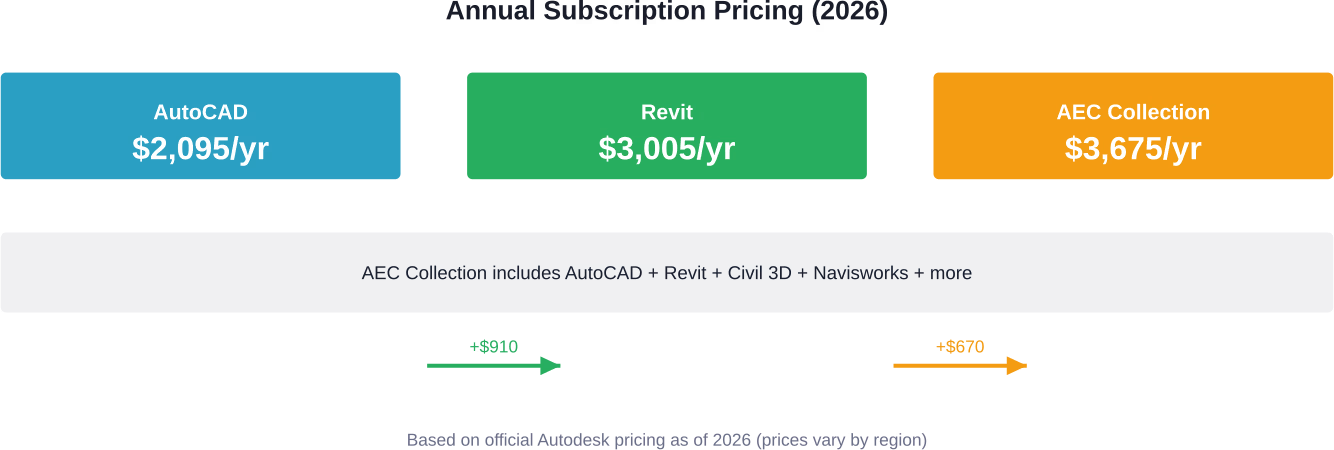
Cost is straightforward but worth clarifying. According to Autodesk’s official pricing information, as of 2026:
- AutoCAD standalone: approximately $2,095/year (annual subscription)
- Revit standalone: approximately $3,005/year (annual subscription)
- AEC Collection (includes both AutoCAD and Revit, plus Civil 3D, Navisworks, and other tools): approximately $3,675/year
The AEC Collection makes sense for firms that need both tools. You’re essentially getting AutoCAD for $670 more than Revit alone, plus access to the full AEC suite.
AutoCAD LT and Revit LT are lower-cost alternatives with reduced functionality. AutoCAD LT strips out 3D modeling and customization. Revit LT removes worksharing and some advanced features. For solo practitioners or small studios, the LT versions can be cost-effective, but confirm that the limitations don’t impact your workflow.
Monthly subscriptions are available but cost significantly more over time. According to official subscription FAQs, annual plans save approximately 33% over monthly pricing.
Which One Should You Learn in 2026?
If you’re just starting out, the answer depends on your career path.
For architects and structural engineers working on building projects, learn Revit first. BIM is the standard for commercial and institutional work. Firms expect proficiency, and the majority of job postings in these fields list Revit as a requirement.
For civil engineers, landscape architects, and site designers, AutoCAD (or Civil 3D) remains dominant. Site work, grading, utilities, and land development workflows are still heavily CAD-based.
For MEP engineers, it’s a split. Larger firms use Revit MEP for coordination. Smaller firms and specialized consultants often stick with AutoCAD MEP or even 2D drafting.
But here’s the practical advice: don’t treat it as either/or. Learning both makes you more versatile. AutoCAD skills transfer quickly once you understand drafting fundamentals. Revit takes longer, but the BIM methodology you learn applies to other platforms like ArchiCAD and Bentley.
Many educational programs, such as VDCI’s CAD/BIM courses, train students in both AutoCAD and Revit precisely because the industry uses both. The goal isn’t mastery of a single tool—it’s understanding when and how to use the right tool for the task.
Can Revit and AutoCAD Coexist?
Yes. And they often should.
According to real-world workflow discussions and verified industry practice, many projects run Revit as the BIM backbone with AutoCAD handling specific details or legacy coordination. A typical setup might include:
- Revit for building architecture, structure, and MEP systems
- AutoCAD for site plans, civil work, and landscape
- Revit for generating coordinated construction documents
- AutoCAD for final sheet composition and annotation refinement
The key is defining clear handoffs. Who owns which files? What gets exported where? How do changes get communicated? Without standards, you end up with duplication, version conflicts, and coordination failures.
Some firms establish a Revit-first policy: if it’s part of the building, it goes in Revit. If it’s site work or a custom detail that doesn’t need coordination, it stays in AutoCAD. That clarity eliminates the gray area where teams waste time debating which tool to use.
Final Verdict
Revit vs AutoCAD isn’t a competition. It’s a question of fit.
AutoCAD is a precision drafting platform with broad application. It’s fast, flexible, and works across industries. Use it when you need control over linework, when you’re working with legacy files, or when the scope doesn’t justify BIM.
Revit is a BIM authoring platform built for coordinated building projects. It’s data-rich, model-based, and designed for multi-discipline collaboration. Use it when coordination matters, when you need schedules and takeoffs, or when BIM deliverables are required.
Most design firms use both. The best workflows leverage each tool’s strengths and establish clear protocols for when and how they interact.
So don’t get stuck on which one is better. Get clear on what your projects need. Then pick the tool—or tools—that deliver it.
الأسئلة الشائعة
Can I open Revit files in AutoCAD?
No. AutoCAD cannot open RVT files directly. Revit models must be exported to DWG format first. The exported file becomes a static 2D or 3D representation and loses all BIM data and parametric functionality.
Is Revit harder to learn than AutoCAD?
Yes. AutoCAD focuses on drafting and is quicker to pick up. Revit requires understanding BIM workflows, families, constraints, and modeling logic, which takes more time and practice to master.
Do I need both AutoCAD and Revit?
It depends on your work. Revit can handle full building design, but AutoCAD is useful for site plans, civil drawings, and working with DWG-based consultants. Many professionals use both depending on project needs.
Can Revit replace AutoCAD completely?
In some workflows, yes. Revit can produce full building documentation, but it is less efficient for certain tasks like detailed drafting or site work. Many teams still use AutoCAD alongside Revit.
Which software is better for freelance work?
AutoCAD is more versatile across industries and often suits freelancers handling varied project types. Revit is essential if you focus on architectural BIM projects where clients require coordinated models and documentation.
Are there free alternatives to Revit and AutoCAD?
Autodesk provides free educational access for students and educators. For professional use, alternatives from other vendors exist, but they may have limitations in features, compatibility, or industry adoption.
How often are Revit and AutoCAD updated?
Both are updated annually, typically with a new major version each year. Subscribers receive updates, performance improvements, and new features as part of their plan.

دراسات الحالة لدينا
لقد تعاملنا مع أكثر من 200 مشروع من مشاريع نمذجة معلومات المباني ونمذجة معلومات المباني للقطاعات التجارية والصناعية والسكنية.
يشمل عملنا ما يلي:
أتمتة تصميم القوالب
Our client from
California, USA
أتمتة تصميم السقف المعلق
Our client from
New York, USA
أتمتة تصميم إطارات الحائط
Our client from
California, USA


